

Nest for Claude

Overview
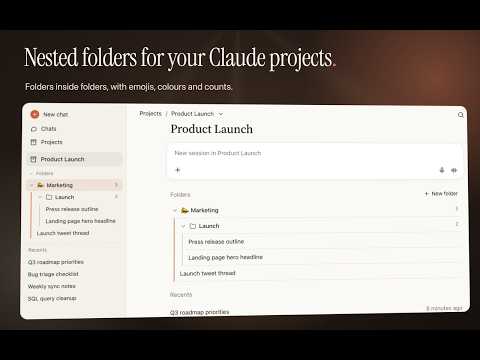
Organize your claude.ai conversations into nested folders per project. Stored locally, no network requests.
Nest for Claude adds nested folders to your claude.ai projects, so long-running projects stay tidy. ORGANIZE • Create folders and sub-folders inside each project, as deep as you need. • Start a new session straight from a folder: it is filed there as soon as you send the first message. • Drag and drop conversations and folders, or file them from the "Add conversations" panel. • Give each folder a name, an emoji and a colour. • Optionally hide filed conversations from the Recents list. FITS IN • Folders appear on the project page and in the sidebar. • Follows claude.ai's light and dark themes instantly. • Available in English and French. PRIVATE BY DESIGN • Everything is stored in your browser. No account, no server, no analytics. • The extension only runs on claude.ai (its toolbar icon is greyed elsewhere) and makes no network requests. • Export your folders to a JSON file and import them back at any time. Free and open source (MIT): https://github.com/Azurioh/nest-for-claude Nest for Claude is an independent project, not affiliated with or endorsed by Anthropic.
0 out of 5No ratings
Details
- Version1.0.0
- UpdatedOctober 22, 2026
- Offered byazurioh
- Size90.93KiB
- Languages2 languages
- Developer
Email
alancunin@gmail.com - Non-traderThis developer has not identified itself as a trader. For consumers in the European Union, please note that consumer rights do not apply to contracts between you and this developer.
Privacy

This developer declares that your data is
- Not being sold to third parties, outside of the approved use cases
- Not being used or transferred for purposes that are unrelated to the item's core functionality
- Not being used or transferred to determine creditworthiness or for lending purposes