

SpamBlocker for Youtube
3 ratings
)
Overview
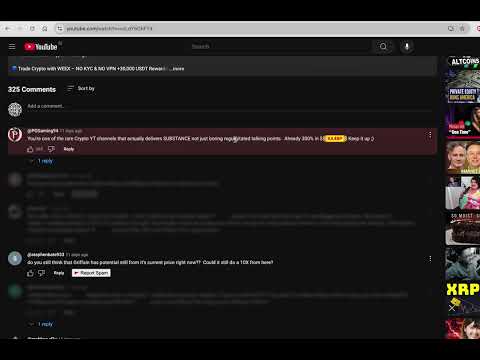
Detect, hide, and report spam or bot comments on YouTube using blocklist and community reporting.
Fed up with crypto spam bots and scams in YouTube comments? So was I. After seeing countless spam and scam comments (and hearing real stories of people losing life savings to comment scams), I decided to build something to help. SpamBlocker for Youtube - is a personal project, built because I wanted to make YouTube safer for myself and others. 1. Instantly hides spam and scam comments on any YouTube video 2. Blocks comments based on a **predefined pattern blocklist** (e.g. common crypto spam patterns) 3. Lets you **add your own blocklist keywords** for custom filtering—your additions also help build a community-powered suggested blocklist for everyone 4. One-click “Report Spam” button to crowdsource detection and help others 5. See how many spam comments were blocked on each page and overall 6. Community-powered: The more people use and report, the better it will get How it works: 1. Open any YouTube video—spam comments vanish automatically 2. Add your own keywords to the blocklist or use smart suggestions 3. Click “Report Spam” to flag new patterns and help others 4. Manage everything from the extension popup and track your impact Key Features: 🛡️ Automatic hiding using a keyword and pattern blocklist (e.g. crypto spam) 👥 Community-powered detection (secure & anonymous) 🚩 One-click spam reporting 🔑 Add your own blocklist keywords—help shape the suggested community blocklist for everyone 📊 See your impact: spam removed per page & in total Privacy: Your privacy is respected: All filtering is local except for reporting, which is anonymous and stored securely. No personal info is ever collected or shared. Note: Right now, this extension is focused on fighting crypto spam and scams (where the problem is worst), but as more people use and report spam, we can expand it to remove all types of spam comments from across YouTube—no matter the topic. Coming soon: With more users and reports, I hope to build a machine learning powered spam detector for future versions. I already have a base model in development, and your participation will help make YouTube safer for everyone! **Let’s make YouTube a safer place for everyone!**
5 out of 53 ratings
Details
- Version1.0.7
- UpdatedOctober 16, 2025
- Offered byKenny Mathew
- Size252KiB
- LanguagesEnglish
- DeveloperHuman First . Design
Maakri tn Tallinn 10145 EEEmail
kennymatthew@gmail.com - Non-traderThis developer has not identified itself as a trader. For consumers in the European Union, please note that consumer rights do not apply to contracts between you and this developer.
Privacy

SpamBlocker for Youtube has disclosed the following information regarding the collection and usage of your data. More detailed information can be found in the developer's privacy policy.
SpamBlocker for Youtube handles the following:
This developer declares that your data is
- Not being sold to third parties, outside of the approved use cases
- Not being used or transferred for purposes that are unrelated to the item's core functionality
- Not being used or transferred to determine creditworthiness or for lending purposes
Support
For help with questions, suggestions, or problems, please open this page on your desktop browser