


Overview
Poke the UI, tell AI what to fix. Inspect any element, leave QA notes, and send context to your AI coding agent.
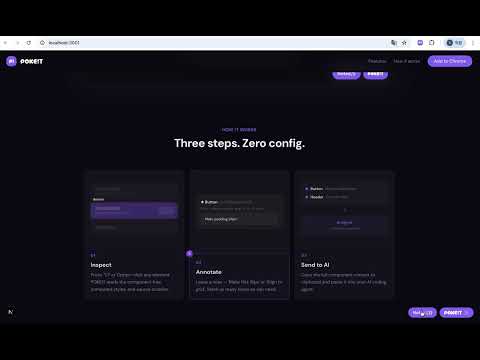
POKEIT — Poke! the UI, tell AI what to fix. The visual QA inspector built for AI-powered development workflows. Click any element on your page, leave a note like "Make this 16px" or "Align to grid," and copy the full component context — tree structure, computed styles, and source paths — straight to your AI coding agent. ━━━━━━━━━━━━━━━━━━━━ 🆕 WHAT'S NEW IN 0.3.0 • Query-aware page scoping — notes on `?tab=weekly` and `?tab=monthly` stay in separate buckets, while tracking parameters (utm_*, gclid, fbclid, etc.) are stripped automatically so they don't fragment your notes • Richer click-to-copy — the copy now also includes the site URL, the component's inner text (auto-extracted even from wrapper divs), and whatever you're still typing in the input • Disabled buttons are now inspectable — elements with `disabled`, `aria-disabled`, or `pointer-events: none` no longer fall through to the parent container • Style-isolated UI — the panel and popup are immune to the host page's global font, letter-spacing, and text-transform rules, so POKEIT always looks consistent • SPA-aware — tab switches via `history.pushState` instantly refresh markers and the notes panel, even if only the query string changes ━━━━━━━━━━━━━━━━━━━━ 🔍 INSPECT Press ⌥P (Option+P) or click the POKEIT icon to activate inspect mode. Hover over any element to see a 3-layer highlight showing margin, padding, and content boundaries. Click to select it. Use ↑↓ arrow keys to navigate to parent or child elements without re-clicking. POKEIT reads: • React component tree — names, nesting, and hierarchy • Parent component resolution — clicking a div shows "ProfileCard > div" instead of just "div" • Computed CSS styles — resolved values, not just class names • Smart class filter — strips hashed names (CSS Modules, styled-components, Emotion) and shows clean utilities • Source file paths and line numbers (via React fiber debug info) • Spacing overlap warnings between parent and child elements • Disabled / aria-disabled / pointer-events:none elements — still inspectable, no falling through to the parent 🗒️ ANNOTATE Leave QA notes directly on any selected element. Describe what needs to change in plain language — "Font size should be 16px," "Remove this margin," "Match the height of the sibling card." Stack as many notes as you need across different components. Notes are scoped per URL state — different routes, different tabs, even different `?filter=` states keep their own annotations. Tracking parameters (utm_*, gclid, etc.) are stripped so analytics noise doesn't fragment your buckets. The notes panel groups everything by page and pins the page you're currently on at the top with a `here` badge. 📋 COPY & SEND TO AI One click copies everything — the page URL, component tree, computed styles, the element's inner text, spacing warnings, all saved notes, AND whatever you're still typing in the input field. The output is grouped per page so each URL keeps its own header, and the first line uses a natural-language phrase ("POKE!T inspector — QA notes from the browser") so AI agents read it as feedback context instead of a project label. Long element text is automatically truncated at 60 characters for readability. Paste into ChatGPT, Claude, Cursor, Windsurf, or any AI coding agent. The AI gets full context to make precise code changes. 📸 SCREENSHOT Download a screenshot of the current page with one click from the QA panel for visual reference. ━━━━━━━━━━━━━━━━━━━━ WHY POKEIT? → For vibe coders & non-developers You see a UI bug but can't describe it precisely enough for the AI to fix. POKEIT bridges that gap — click the problem, describe the fix, and let the AI handle the code. → For designers who vibe code "The padding is wrong" is vague. "ProfileCard (src/components/ProfileCard.tsx:24) has padding 12px, should be 24px" is actionable. POKEIT generates the latter automatically. → For frontend developers Skip the back-and-forth. Get structured, copy-pasteable QA feedback with exact component paths and computed values instead of vague Slack messages. → Zero config Works on any website — production or localhost. No project setup, no dependencies, no build step. Just install and start inspecting. ━━━━━━━━━━━━━━━━━━━━ HOW IT WORKS 1. Install POKEIT from Chrome Web Store 2. Visit any React website (production or localhost) 3. Press ⌥P or click the extension icon 4. Click any element to inspect it 5. Use ↑↓ to navigate to parent/child elements 6. Leave a note describing what to change 7. Click "Copy" — paste into your AI agent 8. AI makes the fix with full context ━━━━━━━━━━━━━━━━━━━━ FEATURES ✓ 3-layer box model highlight (margin / padding / content) ✓ React component tree with source file paths ✓ Parent component resolution (div → ProfileCard > div) ✓ Computed CSS property inspector ✓ Smart class filter — hashed names removed, clean utilities shown ✓ Spacing overlap detection (parent ↔ child) ✓ ↑↓ keyboard navigation for parent/child traversal ✓ Disabled / aria-disabled / pointer-events:none elements inspectable ✓ Query-aware page scoping — notes scoped per pathname + meaningful query + hash ✓ Tracking-parameter denylist — utm_*, gclid, fbclid, mc_eid and friends auto-stripped ✓ SPA route detection — `pushState` / `replaceState` / hash changes refresh markers instantly ✓ Notes panel grouped by page — current page pinned to top with `here` badge ✓ Copy output bundles URL + tree + styles + inner text + your in-progress note ✓ Natural-language copy header so AI agents read it as feedback, not a label ✓ Long element text auto-truncated at 60 chars with ellipsis ✓ Multiple QA notes per page ✓ One-click copy formatted for AI agents ✓ Screenshot capture ✓ Style-isolated UI — immune to host page fonts and letter-spacing ✓ Works on localhost and production ✓ Keyboard shortcut (⌥P) for quick activation ✓ No sign-up required — completely free ━━━━━━━━━━━━━━━━━━━━ PRIVACY POKEIT runs entirely in your browser. No data is sent to any server. Your page content, styles, and notes stay local. The only network request is Chrome's built-in extension update check. ━━━━━━━━━━━━━━━━━━━━ Made for the vibe coding era. Poke it. Fix it. Ship it.
5 out of 51 rating
Details
- Version0.3.0
- UpdatedJune 4, 2026
- Size36.98KiB
- LanguagesEnglish
- Developer
- Non-traderThis developer has not identified itself as a trader. For consumers in the European Union, please note that consumer rights do not apply to contracts between you and this developer.
Privacy

This developer declares that your data is
- Not being sold to third parties, outside of the approved use cases
- Not being used or transferred for purposes that are unrelated to the item's core functionality
- Not being used or transferred to determine creditworthiness or for lending purposes