

Daysift – Find Any Tab Instantly

Overview
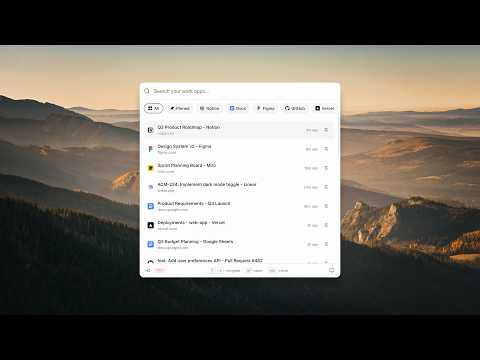
Find anything. Instantly. Private by default. Press ⌘J to get back to any doc, page or tab you opened.
Find anything you've ever opened. Instantly. Daysift replaces tab hoarding, bookmarks, and history with one fast command bar. Smart filtering captures what matters and skips the noise. Press ⌘J (Mac) or Alt+J (Windows) and jump back to any page, document, or note in seconds — no folders, no digging, no exact keywords. 🔒 Private by default · Your history stays local · AI is optional ━━━━━━━━━━━━━━━━━━━━ 🚀 Stop tab overload Close tabs without losing them. What matters is instantly searchable — noise filtered automatically. 🔍 Smarter than history Search using natural language like "that API doc from yesterday" and get the right result, fast. 🤖 Built-in AI (optional) Ask questions, summarise pages, or get quick answers without opening new tabs. Powered by Proton Lumo, the most private AI in the world, based in Europe. Not trained on your data, not logged, not kept after it answers. 📝 Notes that follow you Capture thoughts in a floating window that stays across tabs. ⚡ Do everything from one place Use / commands to open tools, create notes, or navigate instantly. ━━━━━━━━━━━━━━━━━━━━ 🛡️ YOUR PRIVACY MATTERS • Everything stored locally • No accounts, no tracking • AI is opt-in only • AI runs on Proton Lumo (Europe): no training, no logs, nothing kept ━━━━━━━━━━━━━━━━━━━━ Install Daysift and take control of your browser.
4.8 out of 512 ratings
Details
- Version1.0.24
- UpdatedOctober 1, 2026
- FeaturesOffers in-app purchases
- Size281KiB
- LanguagesEnglish
- DeveloperV Ventures GroupWebsite
5, Canon Court Institute Street Bolton BL1 1PZ GBEmail
hello@daysift.comPhone
+44 7526 058071 - TraderThis developer has identified itself as a trader per the definition from the European Union and committed to only offer products or services that comply with EU laws.
- D-U-N-S224973559
Privacy

Daysift – Find Any Tab Instantly has disclosed the following information regarding the collection and usage of your data. More detailed information can be found in the developer's privacy policy.
Daysift – Find Any Tab Instantly handles the following:
This developer declares that your data is
- Not being sold to third parties, outside of the approved use cases
- Not being used or transferred for purposes that are unrelated to the item's core functionality
- Not being used or transferred to determine creditworthiness or for lending purposes