Item logo image for Daysift – Find Any Tab Instantly

Daysift – Find Any Tab Instantly

4.8(

10 ratings

)
Item media 6 (screenshot) for Daysift – Find Any Tab Instantly
Item video thumbnail
Item media 2 (screenshot) for Daysift – Find Any Tab Instantly
Item media 3 (screenshot) for Daysift – Find Any Tab Instantly
Item media 4 (screenshot) for Daysift – Find Any Tab Instantly
Item media 5 (screenshot) for Daysift – Find Any Tab Instantly
Item media 6 (screenshot) for Daysift – Find Any Tab Instantly
Item video thumbnail
Item media 2 (screenshot) for Daysift – Find Any Tab Instantly
Item media 3 (screenshot) for Daysift – Find Any Tab Instantly
Item media 4 (screenshot) for Daysift – Find Any Tab Instantly
Item media 5 (screenshot) for Daysift – Find Any Tab Instantly
Item media 6 (screenshot) for Daysift – Find Any Tab Instantly

Overview

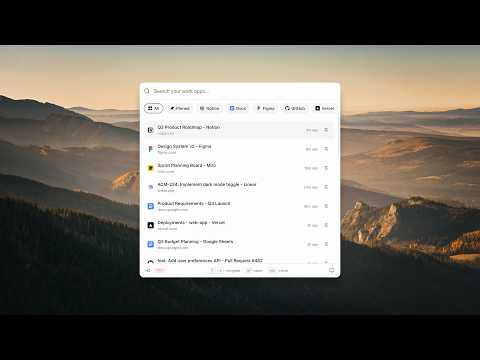
Find anything. Instantly. Private by default. Press ⌘J to get back to any doc, page or tab you opened.

Daysift helps you find anything instantly across your work in your browser. Stop keeping 50 tabs open "just in case." Press ⌘J (Mac) or Ctrl+J (Windows) to search every document, tab, note, and conversation you've opened — all in one fast, powerful command bar. 🔒 Private by default · Your history stays local · AI features are optional and require consent ━━━━━━━━━━━━━━━━━━━━ 🔍 Close tabs without losing them Find any page you've visited — documents, emails, articles, dashboards. Your browser remembers so you don't have to. 🤖 Ask AI for smart answers Have a question? Get a quick answer without opening a new tab. 📝 Floating notes & quick capture Jot down ideas in a lightweight window that stays on top — always accessible while you work. ⚡ Smart shortcuts & actions Type / to create new docs, jump to tools, open notes, and move faster. ━━━━━━━━━━━━━━━━━━━━ 🛡️ YOUR PRIVACY MATTERS • All data stored locally on your device • No accounts, no cloud sync, no tracking • AI features are optional and require explicit consent ━━━━━━━━━━━━━━━━━━━━ Install Daysift and never lose a tab again.

Details

  • Version
    1.0.17
  • Updated
    March 14, 2026
  • Features
    Offers in-app purchases
  • Size
    307KiB
  • Languages
    English
  • Developer
    V Ventures Group
    Peel House 34-44 London Road Suite 211a Morden SM4 5BT GB
    Website
    Email
    hello@daysift.com
    Phone
    +44 7526 058071
  • Trader
    This developer has identified itself as a trader per the definition from the European Union and committed to only offer products or services that comply with EU laws.
  • D-U-N-S
    224973559

Privacy

Manage extensions and learn how they're being used in your organization

Daysift – Find Any Tab Instantly has disclosed the following information regarding the collection and usage of your data. More detailed information can be found in the developer's privacy policy.

Daysift – Find Any Tab Instantly handles the following:

Web history
Website content

This developer declares that your data is

  • Not being sold to third parties, outside of the approved use cases
  • Not being used or transferred for purposes that are unrelated to the item's core functionality
  • Not being used or transferred to determine creditworthiness or for lending purposes

Related

SavedTabs - A better new tab and start page

4.8

Save your open tabs with one click and continue browsing later

History Shortcut - Fast History Button

5.0

History Shortcut - One-click toolbar button to instantly open your browsing history page. Fast, lightweight, and private

Clipboard History Pro

4.9

Never lose copied text again. Search, pin, and paste from your complete clipboard history.

ScrollSaver - Intelligent Page Position Memory

3.5

Automatically saves and restores your scroll position on any webpage. Perfect for researchers, readers, and professionals.

Tab Saver Pro - Export & Backup Tabs

4.3

Save all your open tabs as an HTML file. Perfect for freeing up memory, backing up research, and organizing browsing sessions.

SmartTab - Tab Manager & History Search

5.0

Tab manager that searches inside tab content. Organize unlimited tabs, restore closed tabs & browse with complete privacy

Tab Manager

5.0

Your tab manager: save, restore, organize, search, switch, close browser tabs & sessions easy. All tab in one saver management tool

QuickFind: History, Bookmarks & Tabs

5.0

Quickly search and access your browsing history, bookmarks, and open tabs.

Side Search Panel

5.0

Activate this extension to open the side panel. Search for anything, and get result in new tab.

Tab Switcher +

0.0

Fast switch between tabs and windows. Quick search filter. Export all open URLs with a click.

Kill Clone Tabs

4.2

Find and close duplicate tabs. Sort, group, and manage tabs. Highlight text on pages. Copy tab URLs. Boost your productivity!

Ctrl-F Plus: Ctrl + F Search Across All Tabs

4.0

Find words and phrases across ALL your open tabs! 🔍

SavedTabs - A better new tab and start page

4.8

Save your open tabs with one click and continue browsing later

History Shortcut - Fast History Button

5.0

History Shortcut - One-click toolbar button to instantly open your browsing history page. Fast, lightweight, and private

Clipboard History Pro

4.9

Never lose copied text again. Search, pin, and paste from your complete clipboard history.

ScrollSaver - Intelligent Page Position Memory

3.5

Automatically saves and restores your scroll position on any webpage. Perfect for researchers, readers, and professionals.

Tab Saver Pro - Export & Backup Tabs

4.3

Save all your open tabs as an HTML file. Perfect for freeing up memory, backing up research, and organizing browsing sessions.

SmartTab - Tab Manager & History Search

5.0

Tab manager that searches inside tab content. Organize unlimited tabs, restore closed tabs & browse with complete privacy

Tab Manager

5.0

Your tab manager: save, restore, organize, search, switch, close browser tabs & sessions easy. All tab in one saver management tool

QuickFind: History, Bookmarks & Tabs

5.0

Quickly search and access your browsing history, bookmarks, and open tabs.

Google apps
