

Day21 - Bulk Social Media Downloader
Overview
Bulk download photos and videos from your favorite social media platforms.
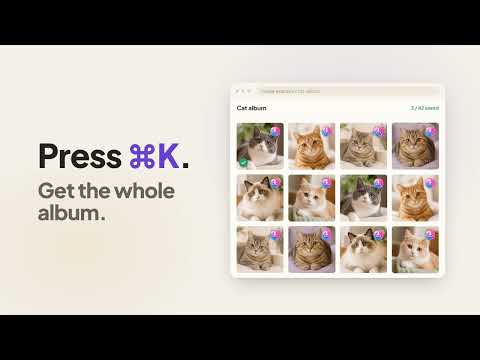
Download photos and videos in bulk from the social pages you already browse — with a real download queue, resume support, and zero data collection. supports most social platform WHAT YOU CAN DOWNLOAD ✔ Videos, reels, and short clips — in the highest quality available ✔ Photos, image posts, and albums ✔ Stories and highlights ✔ Carousels and multi-image posts ✔ Whole profiles, boards, and media grids in one run KEY FEATURES ✔ Bulk download: grab an entire album, board, profile or media grid with one click ✔ Download queue: keep triggering — tasks line up and run one by one ✔ Resume: interrupted collections pick up where they stopped ✔ Full quality: highest available resolution; HD video with merged audio ✔ Audio only: extract the audio track from any video ✔ Smart filenames: date, creator, index — your pattern, your folders ✔ Caption files: optionally save the post text, with a link to the original post, next to the media ✔ Skip duplicates: already-downloaded files are remembered and skipped ✔ In-page buttons: a download button right on every photo and video ✔ Command palette: press Cmd+K / Ctrl+K to download whatever you are looking at ✔ Webhook events: notify your own HTTPS endpoint about download progress — free ✔ Interface in English, 简体中文, 繁體中文, 日本語, 한국어 and Español PRIVACY BY DESIGN The extension installs with access to zero websites. You grant each site explicitly, on first use, and can revoke that access at any time. No account, no analytics, no external servers: everything runs inside your browser, and nothing is collected — ever. Full privacy policy: https://www.day21.dev/bulk-social-media-downloader/privacy Terms of service: https://www.day21.dev/bulk-social-media-downloader/terms FAIR USE Download only content you own or have permission to save. Respect the terms of service of every site you use and the rights of the original creators. Questions or feedback: https://www.day21.dev/bulk-social-media-downloader/support v0.11.0 — 2026-10-29 • Added: a "What's new" link at the bottom of the settings opens a short list of what changed in each version. • Added: the Output & naming settings now show a folder tree of what your downloads will look like, plus six ready-made layouts to pick from. • Added: the file name and folder rules are edited in one line with two menus, "Choose a preset" and "Insert a field". On a wide enough screen the folder tree sits beside the settings instead of above them, and hovering a field in the menu highlights where it shows up in the tree. • Added: a "Not working?" note next to the layouts explains that another download manager extension can override Day21's file names and folders, names a few common ones, and says how to fix it. • Added: with "Save captions" on, the caption file now ends with a link to the original post on every supported site, and a post with no text gets a caption file containing only the link. Stories, highlights, profile pictures and whole albums or groups get no link. • Added: on one supported site, pictures from a multi-picture post now have a "Whole post" button next to the single-picture button, and that site's page settings include "One folder per post". • Changed: "Split into subfolders" is now "One folder per post" and behaves differently. Before, a multi-picture post got its own folder straight in your download folder; now that folder sits inside your subfolder, for example author / post, and the subfolder rules have a new "Post" level. If you had subfolders turned off, multi-picture posts still get their own folder as before. • Fixed: when another extension renamed Day21 downloads to download.jpg or dropped their subfolders, Day21 now puts the right name and folder back. Chrome lets the most recently installed extension decide when several handle file names, so this only works if Day21 was installed after the other extension, and an extension that deliberately renames files still wins. • Fixed: changing the language at the top of the in-page settings now applies right away instead of waiting for Save. • Fixed: on some supported sites, every picture of a multi-picture post got its own copy of the same caption file; the post now gets one. • Fixed: photo posts on one supported site were saved under a generic name with no caption file; they now use the author's name and get a caption file with the post link. v0.10.0 — 2026-10-28 • Added: more file name fields: time, year, month, day, hour, minute, second, and numbers padded with zeros (01, 001, 0001). • Added: subfolders now use the same editor as file names. Type / to add a folder level, for example author / year / month, or pick one of the presets. • Changed: on one supported site, the story button now saves all of the person's current stories, not only the one you are viewing. The command palette still saves just the current one. • Fixed: saving a person's stories and highlights failed on one supported site. v0.9.0 — 2026-10-27 • Added: when you allow sites on the setup page, a new "Enable all" button asks for every remaining site in one Chrome prompt instead of one prompt per site. • Fixed: exporting links only no longer counts as saved files when deciding whether to ask for a review. • Fixed: a missing divider line in the review invitation card. v0.8.0 — 2026-10-07 • Added: if another extension is stopping downloads on a site, the toolbar popup now tells you and explains how to fix it. • Added: if your "Media to save" setting skips everything on a page, a notice explains why, with a button that opens the settings. • Changed: when a download fails, you can now see which files failed and why, and "Open download progress" shows your last download. • Changed: when a site is limiting requests, you now get a clear message instead of a general error. • Changed: settings changed on the options page apply to open tabs right away, and Stop cancels large files immediately. • Changed: buttons and panels on supported sites now use your system fonts instead of loading fonts from an outside server. • Fixed: download problems across all supported sites, including marketplace listings, albums, carousels, boards, collages, GIFs and saving to a folder you choose each time. • Fixed: PNG and WebP images keep their real file extension, long file names are no longer cut off, and captions are saved once per post. v0.7.0 — 2026-09-27 • Added: a new "Original file name" choice for naming downloads. Files keep the name the site itself gave them, for example 799773883_1655301892611257_2259554648547538129_n.jpg, instead of a name built from the post number. Pick it as a preset, or combine it with other fields such as the author name. When a file has no such name, the usual name is used instead. • Fixed: on one supported site, downloading a profile picture always failed and the queue asked you to wait a few minutes. Waiting did not help, because the site stopped answering the request used for profile pictures. The picture is now taken from the profile page you already have open, in full size. v0.6.0 — 2026-09-19 • Added: support rednote. Download a single post from its detail page, or run a bulk download of a profile's posts, a saved collection, a liked collection, search results, or the home feed. Photos, photo sets and videos are covered, with the same count limits, resume, skip-already-downloaded, caption files and cover files as everywhere else. • Changed: a bulk download now starts saving files as soon as the first item is found, instead of waiting for the whole page to be collected first. On sites that need one request per post, the first file used to take about forty seconds to appear. • Changed: while a page is being collected, the progress panel now shows which item it is reading and how many are on the page, instead of standing at "found 0". • Added: each file being downloaded now shows a live percentage and a progress bar, so a large video no longer looks stuck. When the site does not report a file size, the amount downloaded so far is shown instead. v0.5.2 — 2026-09-05 • Fixed: on one supported site, story-style 24-hour posts opened from a profile link downloaded nothing and reported failure. The site started rate-limiting the lookup used to resolve the account, so the download now reads the account id already present on the page and no longer depends on that lookup. • Changed: when a site is limiting how often it accepts requests, the download queue now says so and suggests waiting a few minutes, instead of showing a generic failure. Retrying right away only made the limiting worse. v0.5.1 — 2026-08-29 • Fixed: bulk download of a profile's short-form videos produced no files while reporting success. • Fixed: captions were missing for photos on one supported site. • Fixed: filenames used the download date instead of the real upload date, so a whole batch collapsed onto today's date. • Fixed: bulk download only worked from a profile's media tab. It now works from every profile tab. • Fixed: files with the same generated name collided between pages of one batch. Downloads into a folder you picked could be overwritten without warning. • Fixed: the index naming variable restarted at 1 on every page. Numbering is now continuous across the whole batch. • Fixed: caption and cover files did not match their media file when the media file was renamed on the way to disk. The "Saved to ..." path is fixed by the same change. • Changed: duplicate names are now numbered photo.1.jpg, photo.2.jpg — previously photo (2).jpg.
4.9 out of 512 ratings
Details
- Version0.11.0
- UpdatedOctober 30, 2026
- Size5.34MiB
- Languages24 languages
- DeveloperWebsite
Email
day21dev2026@gmail.com - Non-traderThis developer has not identified itself as a trader. For consumers in the European Union, please note that consumer rights do not apply to contracts between you and this developer.
Privacy

This developer declares that your data is
- Not being sold to third parties, outside of the approved use cases
- Not being used or transferred for purposes that are unrelated to the item's core functionality
- Not being used or transferred to determine creditworthiness or for lending purposes
Support
For help with questions, suggestions, or problems, please open this page on your desktop browser