

Day Trading - Trading Chart Analyzer

Overview
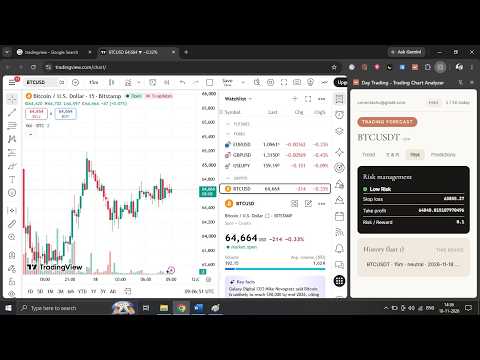
Best AI trading app for beginners: AI trading analysis, support/resistance, forecasts & risk levels. No screenshots needed.
Day Trading - Trading Chart Analyzer is the best AI trading app for beginners who want fast, clear market analysis without uploading screenshots or learning complicated chart tools. Enter a market symbol, choose your timeframe, and click Analyze. You will get a probabilistic price forecast, trend direction, key support and resistance levels, and risk context, all inside Chrome. WHY TRADERS CHOOSE THIS BEST AI TRADING APP • No screenshots, no uploads: just type the symbol (for example BTCUSDT or EURUSD), pick a timeframe, and click Analyze • Built for beginners: a clean popup summary plus a full breakdown in Chrome's side panel • Works for day trading and scalping: analyze multiple timeframes, from short scalp setups to longer views • Runs on your device: the forecast model runs locally in your browser WHAT YOU GET: AI TRADING ANALYSIS IN ONE CLICK • Probabilistic price forecast for the next few candles across different timeframes • AI analyzer for trading: trend analysis and key support and resistance levels • Risk context and suggested risk management levels • Clean summary in the popup, full breakdown in the side panel • History of your recent analyses so you can review past setups BEST DAY TRADING APP FOR BEGINNERS New to trading? This extension turns complex chart reading into a simple workflow. If you've searched for "day trading for dummies", this tool shows what the market is doing (trend, levels, risk) in plain, readable form, so you can learn while you analyze. SCALP TRADING AI FOR FAST DECISIONS Use this scalp trading AI tool on short timeframes to identify nearby support and resistance zones and see the probable direction of the next few candles before you decide. FOREX AI TRADING AND CRYPTO ANALYSIS Use it for forex AI trading analysis and crypto pairs alike. Looking for an AI forex trading bot? Note that this is an analysis assistant, not an auto-trader. It does not place trades for you. It helps you check probabilistic price outcomes and make your own informed decisions. PRIVATE BY DESIGN: RUNS ON YOUR DEVICE The forecast model and ONNX runtime are bundled with the extension, so analysis runs locally in your browser. There is no backend server to start and no Python installation. Market price data is fetched from supported data providers. OPTIONAL PLAN RECOGNITION No account or password is required. With your permission, the extension reads your Chrome profile email to recognize your plan and usage across devices. You can reset this identity at any time from the Plans panel. SUPPORTED MARKETS Crypto pairs and forex pairs supported by the underlying market-data providers. Availability depends on the provider and your region. HOW TO USE (3 STEPS) 1. Open the extension and enter a market symbol 2. Select your timeframe 3. Click Analyze to see the forecast, support and resistance, and risk levels IMPORTANT DISCLAIMER: This extension provides probabilistic analysis for educational and informational purposes only. It is not financial advice. Forecasts are not guarantees, and trading involves substantial risk of loss. Never risk money you cannot afford to lose.
0 out of 5No ratings
Details
- Version1.1.0
- UpdatedNovember 22, 2026
- Offered byconectashu
- Size111MiB
- LanguagesEnglish (United States)
- DeveloperASHUTOSH PANDA
GOVINDTOLA , IN FRONT OF RANI SATIJI MANDIR SAMBALPUR, Odisha 768005 INEmail
conectashu@gmail.comPhone
+91 70083 56841 - TraderThis developer has identified itself as a trader per the definition from the European Union and committed to only offer products or services that comply with EU laws.
Privacy

Day Trading - Trading Chart Analyzer has disclosed the following information regarding the collection and usage of your data. More detailed information can be found in the developer's privacy policy.
Day Trading - Trading Chart Analyzer handles the following:
This developer declares that your data is
- Not being sold to third parties, outside of the approved use cases
- Not being used or transferred for purposes that are unrelated to the item's core functionality
- Not being used or transferred to determine creditworthiness or for lending purposes
Support
For help with questions, suggestions, or problems, visit the developer's support site