

Datemark - Extract Events from Web Pages with AI

Overview
AI-powered tool to automatically extract events from any webpage and add them to Google Calendar in seconds.
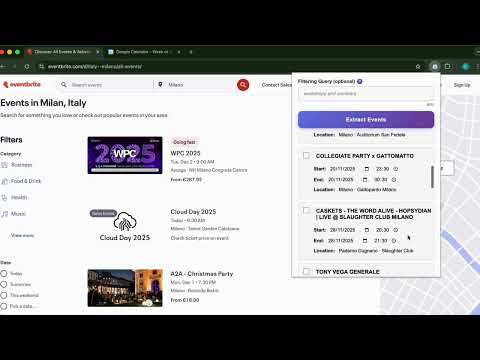
Never miss another event! Datemark is your intelligent calendar companion that magically transforms any webpage into organized calendar events with just a couple clicks. Imagine you're browsing a concert website, reading a newsletter about upcoming webinars, or checking out a conference schedule. Instead of manually copying dates, times, and locations into your calendar, Datemark does the heavy lifting for you. With AI-powered intelligence, it automatically finds and extracts event details from any webpage you're viewing. KEY FEATURES: - AI-powered event detection - finds dates, times, locations automatically - Smart filtering - search for specific events with queries - Bulk operations - add multiple events at once - Edit before adding - review and modify details - Works on any webpage - concert listings, newsletters, social media Perfect for: 📅 Event planners organizing multiple events 🎓 Students tracking assignment deadlines 🎫 Concert-goers saving show dates 📧 Newsletter readers extracting event info 💼 Professionals managing schedules HOW IT WORKS: 1. Visit any webpage with events 2. Click Datemark icon 3. Optionally insert a filtering query to refine extraction 4. AI extracts event details instantly 5. Review, edit, and select events 6. Add to Google Calendar with one click FREE TIER: 50 event extractions per month PRIVACY & SECURITY: - Secure OAuth authentication - Data processed only when you activate the extension - No tracking or data selling - Open source on GitHub Save hours of manual calendar entry. Let AI do the work! Support: infodatemark@gmail.com
4.6 out of 513 ratings
Details
- Version1.0.2
- UpdatedDecember 1, 2025
- Size1.24MiB
- LanguagesEnglish
- DeveloperWebsite
Email
infodatemark@gmail.com - Non-traderThis developer has not identified itself as a trader. For consumers in the European Union, please note that consumer rights do not apply to contracts between you and this developer.
Privacy

This developer declares that your data is
- Not being sold to third parties, outside of the approved use cases
- Not being used or transferred for purposes that are unrelated to the item's core functionality
- Not being used or transferred to determine creditworthiness or for lending purposes