


Overview
AI coach for Tinder — framework-based reply suggestions, conversation analysis, and affinity-driven auto-swipe.
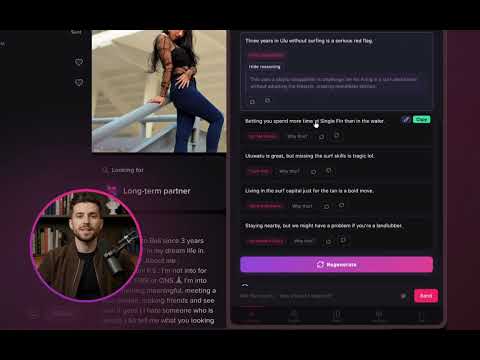
Stop guessing what to say. Learn what actually works. DateIQ is an AI coach that sits next to Tinder and teaches you how to write messages that attract — using real moves pulled from a decade of texting research, not vibes. --- COACH REPLIES YOU CAN LEARN FROM Open any match and Coach drafts replies grounded in proven texting moves — push-pull, callbacks, takeaways, and dozens more. Each suggestion comes with a one-line "why" so you understand the move, not just paste it. Over time you stop needing suggestions because you've internalized the patterns. --- CHAT WITH COACH ABOUT YOUR OWN CONVERSATION Coach is a full chat sidebar with the match's bio, her photos, your entire conversation, and your notes in context. Ask things like: - "Why did she go cold?" - "Is this the right time to ask her out?" - "What should I try here?" You get specific, grounded advice. The wingman who actually paid attention to the thread. --- TRIAGE YOUR INBOX, DON'T DROWN IN IT The Next Action queue ranks every active match by priority and surfaces the 3–5 that actually deserve your attention right now. Priority blends: - Conversation stage (opening / building / closing / reviving) - Match temperature (warmth × tension) - Affinity score - Recency and engagement A green "Ready to ask" chip lights up only when she's crossed the close-readiness threshold (≥5 inbound messages, recent reply, engagement signals, no recent decline) — so you stop guessing whether it's too early to propose a meet. Filter the queue by stage to batch-process openers, revive stale threads, or close out the warm ones — instead of scrolling your full match list trying to remember who's where. --- AUTO-SWIPE THAT RESPECTS YOUR TIME Build swipe rules in plain English on every plan, including free: - Keywords she must (or must not) mention - What she's looking for - Age range, distance, height - Education, languages, and more On paid tiers, your trained affinity model joins the decision. It scores every card against the taste you've shown it, so auto-swipe skips profiles your rules would pass but your taste says you'd dislike. One slider controls how much affinity influences the call. --- THE SIGNALS WORKING BEHIND THE SCENES DateIQ scores every match on four axes you can see and sort by: - STAGE — opening, building, closing, or reviving, classified from message history. - TEMPERATURE — a 0–100 gauge blending warmth (cold → hot → cooling) with tension (flirtation intensity). - AFFINITY — your taste model's verdict on how well she matches what you actually want, learned from 15–40 wizard ratings (paid tiers). - CLOSE READINESS — a 5-check gate that tells you when a conversation is ripe for the ask, hidden otherwise so it never nudges you to push too early. These feed priority scoring, the Next Action queue, and the sort/filter controls in your match list — so the matches that matter rise to the top automatically. --- PROFILE FEEDBACK THAT'S ACTUALLY SPECIFIC Score My Profile runs your photos through a vision model and tells you which to keep, which to swap, and which group shots are confusing people. Coach can also read your bio and rewrite it in your voice. --- MATCH ANYWHERE IN THE WORLD Set any GPS location and start matching in that city before you land. --- PRIVACY Your match data, conversations, and photos stay on your device by default. They're only sent to a server when you trigger an AI feature (reply suggestions, Coach Chat, photo scoring, profile rewrite), and only the context that feature needs is included. No background syncing. No analytics on your matches. --- WHAT'S NEW IN 2.1 - Enhanced internal telemetry. WHAT'S NEW IN 2.0 - Coach is now the center of the product. Every AI reply comes with a one-line "why," and you can click through for a deeper explanation of the move. - Coach Chat now reasons over your full conversation and notes, and can recommend which match in your queue to focus on next — not just what to reply. - Auto-swipe is now affinity-driven on paid tiers. The trained taste model (Wingman) scores cards alongside your rule-based filters; one slider controls how much the score influences the decision. - Reply card redesigned: each option shows the move, a one-line "why," and an expandable explanation.
0 out of 5No ratings
Details
- Version2.1.0
- UpdatedMay 24, 2026
- FeaturesOffers in-app purchases
- Size788KiB
- LanguagesEnglish
- DeveloperIQ Comp Holdings LLCWebsite
30 N Gould St Sheridan, WY 82801-6317 USEmail
theiqcomp@gmail.comPhone
+1 307-998-9130 - TraderThis developer has identified itself as a trader per the definition from the European Union and committed to only offer products or services that comply with EU laws.
- D-U-N-S145750234
Privacy

DateIQ: AI Tinder Assistant — Reply Coach & Auto-Swipe has disclosed the following information regarding the collection and usage of your data. More detailed information can be found in the developer's privacy policy.
DateIQ: AI Tinder Assistant — Reply Coach & Auto-Swipe handles the following:
This developer declares that your data is
- Not being sold to third parties, outside of the approved use cases
- Not being used or transferred for purposes that are unrelated to the item's core functionality
- Not being used or transferred to determine creditworthiness or for lending purposes
Support
For help with questions, suggestions, or problems, visit the developer's support site