

Dataverse Schema Inspector - Logical Names & Metadata
2 ratings
)
Overview
See & copy Dataverse schema (logical) names on Dynamics 365 / Power Apps forms - Web API, OData, FetchXML, option sets.
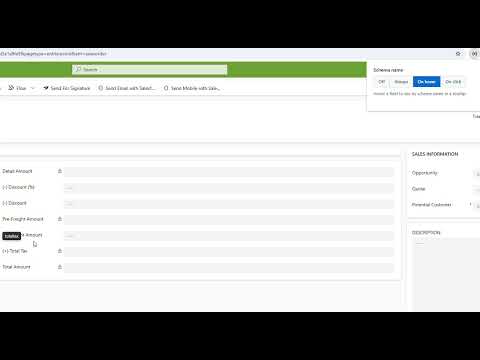
Dataverse Schema Inspector — instantly see and copy logical names on Dynamics 365 & Power Apps forms. Stop hunting through the maker portal or solution files just to find a field's schema name. This lightweight developer tool displays Dataverse schema (logical) names directly on model-driven forms — on hover, on click, or across every field at once — and provides copy-ready code formats for Web API, OData, FetchXML, C#, and JavaScript. Built for Dynamics 365 / Power Apps developers, consultants, and makers who work with Dataverse metadata daily. ✨ What It Does • On Hover: Point at any field (label, control, or value) to see its logical name in a tooltip. • On Click: Click a field to reveal its schema name under the label and copy it automatically with a quick confirmation. • Always On: Display every field's schema name beneath its label, with a floating filter box to search fields quickly. • Off Mode: Turn off overlays instantly with a single click. 🛠️ Developer Metadata Overlay (Ctrl+Shift+X or Right-Click → Get Metadata) • Copy-Ready Formats: Logical Name, Table.Column, Web API property (_field_value for lookups), OData $select / $filter, C#, JavaScript, and FetchXML. • Field Details: Type, display name, required level, format, max length, min/max/precision. • Option Sets: View option set values (value = label) with copy-all support. • Lookups: Target entities and Web API navigation properties. • Endpoint Links: Direct deep link to the Web API metadata endpoint for any field. • CSV Export: Export all form fields to a CSV file in one click. • Recent History: Store recent copies for fast re-pasting. ⚡ Built for Productivity • Build plugins, JavaScript, Power Automate flows, and integrations faster without guessing column names. • Instant OData / Web API / FetchXML code snippets. • Onboard quickly to unfamiliar organizations by reading schemas directly off forms. 🔒 Private & Secure • All processing happens locally in your browser. • No external data transmission, tracking, or telemetry. ✅ Supported Domains • *.crm.dynamics.com • *.dynamics.com • *.powerapps.com
5 out of 52 ratings
Details
- Version1.1.0
- UpdatedAugust 7, 2026
- Offered byVelmurugan
- Size38.87KiB
- LanguagesEnglish (United States)
- Developer
Email
velsmail@gmail.com - Non-traderThis developer has not identified itself as a trader. For consumers in the European Union, please note that consumer rights do not apply to contracts between you and this developer.
Privacy

This developer declares that your data is
- Not being sold to third parties, outside of the approved use cases
- Not being used or transferred for purposes that are unrelated to the item's core functionality
- Not being used or transferred to determine creditworthiness or for lending purposes
Support
For help with questions, suggestions, or problems, please open this page on your desktop browser