

Datastripes Lens: Table to Chart & Data Visualizer

Overview
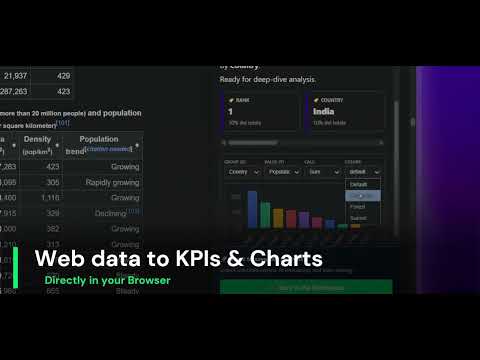
Turn any web table into charts, insights and Excel/CSV in one click. Table scraper, data visualizer and exporter. Free.
Turn any web table into charts, insights and an Excel-ready file, in one click. No copy-paste, no sign-up. 🏆 Top 5 Product of the Day on Product Hunt Datastripes Lens spots every data table on the page you're reading and adds a small "Visualize" button next to it. One click opens a dashboard right beside the page: charts, key insights and clean data you can export anywhere. 📊 INSTANT TABLE TO CHART Lens picks the best chart for your data: dates become timelines, categories become rankings, and prices are averaged instead of summed. Group by any column and change the calculation in one click, like a pivot table but instant. 💡 INSIGHTS IN PLAIN ENGLISH Lens shows who leads, how values change over time, where the outliers are and which columns move together. A data health score flags missing values and duplicates. 📋 EXPORT ANYWHERE Copy to Excel or Google Sheets in one click, download as CSV or JSON, or copy as a Markdown table. Save any chart as a high-resolution PNG for slides and reports. 🌐 WORKS WITH HTML tables on finance, sports and reference sites, data grids in web apps, Google Analytics 4 reports, and CSV or JSON files opened in the browser. Grab lists and cards with "Pick any element", or highlighted text with a right-click. 🔒 100% LOCAL AND PRIVATE Your data never leaves your computer. All analysis runs in your browser: nothing is stored, collected or sent to any server. No account, no tracking, no ads. Safe for enterprise and corporate use. ⚡ FAST AND LIGHTWEIGHT The dashboard loads only when you open it, so pages stay fast. Lens reads numbers and dates in any format and any language. ⌨️ SHORTCUTS Alt+Shift+V visualizes the main table on the page, Alt+Shift+P lets you pick any element. The toolbar icon shows how many tables are on the current page. PERFECT FOR Analysts, journalists, researchers and students: anyone tired of copying tables into a spreadsheet just to see a chart. Want to go further? Open your data in Datastripes for AI forecasting, combined sources and shareable dashboards.
5 out of 51 rating
Details
- Version2.1.0
- UpdatedOctober 23, 2026
- Size155KiB
- Languages6 languages
- DeveloperWebsite
Email
info@superiorgames.eu - Non-traderThis developer has not identified itself as a trader. For consumers in the European Union, please note that consumer rights do not apply to contracts between you and this developer.
Privacy

Datastripes Lens: Table to Chart & Data Visualizer has disclosed the following information regarding the collection and usage of your data. More detailed information can be found in the developer's privacy policy.
Datastripes Lens: Table to Chart & Data Visualizer handles the following:
This developer declares that your data is
- Not being sold to third parties, outside of the approved use cases
- Not being used or transferred for purposes that are unrelated to the item's core functionality
- Not being used or transferred to determine creditworthiness or for lending purposes
Support
For help with questions, suggestions, or problems, visit the developer's support site