

Data Saver — Block Ads, Images & Video
4 ratings
)
Overview
Cut your data usage by blocking ads, images and autoplay video. Built for slow, capped or metered connections.
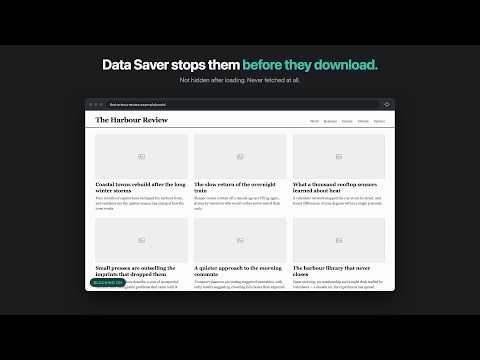
Save mobile data in Chrome. Ads, trackers, images and auto playing video are stopped before they download — not hidden after — so you never pay for those bytes. Built for anyone on a capped or metered connection. Chrome's built-in Lite Mode is gone. This puts that control back and lets you choose what gets blocked on each site. ━━━━━━━━━━━━━━━━━━━━━━━━━━━━━━━ WHAT IT BLOCKS 🚫 Ads and trackers — a maintained blocklist of known ad and tracking domains, checked locally by the browser. Nothing is sent to a server to make a decision. 🖼️ Images — pages load as text. Each blocked picture leaves a faint placeholder; hover it and press Load image to fetch just that one. 🎬 Video and audio — autoplay stops before it starts, and the streaming requests (HLS and DASH) most players rely on are blocked too, so a player really stops using bandwidth rather than just being hidden. Want to watch one? Play on this page lets it through until you leave. ━━━━━━━━━━━━━━━━━━━━━━━━━━━━━━━ SEE WHAT YOU SAVE 📊 The popup counts everything blocked and estimates the bytes that saved, worked out on your device. 📈 The dashboard adds a 14-day trend and the sites where you saved most. ━━━━━━━━━━━━━━━━━━━━━━━━━━━━━━━ CONTROL, NOT ALL-OR-NOTHING ▶️ The big streaming and social sites work out of the box — you already know they are heavy, and blocking them just breaks them. One tap turns blocking on for any of them. 🗺️ Image searches and maps load in full. You went there to look, so they are left alone. 📞 Calls, chat, screen sharing and remote desktop are never interrupted. Popular video-call, messaging, screen-sharing and remote-desktop services are left alone. ⚡ One tap pauses everything on the current site without touching your other settings, or press Alt+Shift+D. The toolbar icon shows OFF there, and the choice sticks. 🎛️ Per-site rules — for example, block ads on a site but let its pictures through. 🍪 Cookie banners (on, can be switched off) — picks "reject" or "necessary only" where offered. It never accepts on your behalf. 🚪 Pop-up windows (on, can be switched off) — stops windows a page opens by itself. Ones you open by clicking still work. 📶 Connection speed (optional) — lets pictures through when your connection is fast, using the browser's own speed estimate. ━━━━━━━━━━━━━━━━━━━━━━━━━━━━━━━ COMMON QUESTIONS Is it just an ad blocker? No. Ads are one of three switches, and everything is stopped at the network layer, so the bytes are never fetched. Will it break websites? Pages look plainer without pictures, and some need them. That is why one picture loads with a click and a whole site unblocks with one tap. How much will I save? It depends on the sites you visit. The popup shows your own figure, labelled an estimate because Chrome does not report the size of a request it stopped. Does it collect anything? No. No server, analytics, telemetry or account. Settings and counts stay on your device, and turning off the per-site history deletes it. ━━━━━━━━━━━━━━━━━━━━━━━━━━━━━━━ WHO IT IS FOR Anyone who pays by the gigabyte — on a prepaid mobile plan, a phone hotspot or a rural connection — and organisations that pay for bandwidth the same way. ━━━━━━━━━━━━━━━━━━━━━━━━━━━━━━━ PRIVACY Every rule ship inside the extension and runs in your browser. The source is public, so every claim here can be checked. Privacy policy: https://data-saver-extension.pages.dev/privacy-policy Source code: https://github.com/RatKush/Data-saver-extension For organisations: https://data-saver-extension.pages.dev Available in 25 languages.
5 out of 54 ratings
Details
- Version2.6
- UpdatedOctober 13, 2026
- Offered byratkush
- Size227KiB
- Languages25 languages
- Developer
Email
kushwaharatnesh2001@gmail.com - Non-traderThis developer has not identified itself as a trader. For consumers in the European Union, please note that consumer rights do not apply to contracts between you and this developer.
Privacy

This developer declares that your data is
- Not being sold to third parties, outside of the approved use cases
- Not being used or transferred for purposes that are unrelated to the item's core functionality
- Not being used or transferred to determine creditworthiness or for lending purposes
Support
For help with questions, suggestions, or problems, please open this page on your desktop browser