

Dark Mode Pro - Night Shift & Eye Care

Overview
Powerful Dark Mode with 10+ themes, Night Shift, Blue Light Filter, custom scheduling & 15+ controls for eye comfort
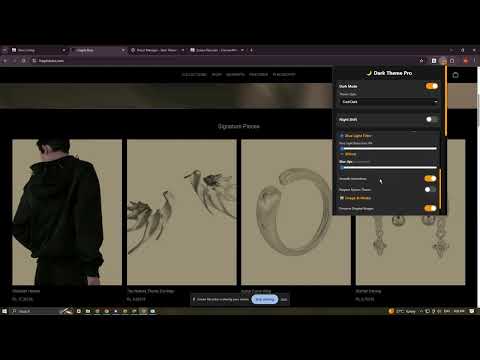
🌙 Dark Mode Pro: The Ultimate Eye Comfort Solution Tired of blinding white screens? Dark Mode Pro gives you complete, pixel-perfect control over how you view the web. It’s more than just a dark theme—it’s a powerful suite designed to protect your eyes, reduce blue light, and give you the perfect viewing experience, day or night. 🛡️ Protect Your Eyes & Sleep Better We focus on your health with features dedicated to reducing strain and improving your sleep quality. Night Shift Mode: Automatically warms your screen, reducing harsh blue light for better sleep. No more struggling to fall asleep after a late-night browsing session! Blue Light Filter: Advanced filter that works independently of Dark Mode, giving you an extra layer of eye protection in low-light conditions. 📖 Reading Mode: Instantly strips away distractions and optimizes typography for comfortable, focused reading of long articles and blogs. 📊 Usage Statistics: Track exactly how much you use the extension, the estimated time you've saved, and the reduction in eye strain. 🎨 Total Customization, Your Way Why settle for one dark mode? Dark Mode Pro provides unprecedented control over the look and feel of every website. 10 Unique Themes: Instantly switch between professional themes like OLED Black (True Black), Sepia, High Contrast, Warm, Cool, Purple, Green, and Red to find your favorite look. 16 Quick Presets: Access predefined settings for specific activities like Reading, Coding, Gaming, Night, Focus, and Vibrant. 🎛️ 15+ Advanced Controls: Fine-tune the visuals with dedicated sliders for Brightness, Warmth (Color Temperature), Contrast, Saturation, Hue, and Blur. Custom CSS: For the power users, write your own CSS to achieve ultimate customization on specific elements. 🖼️ Smart Image Control: Choose whether to preserve the original colors of photos and videos or invert them for a consistent dark look. ⏰ Smart & Automated Management Set it and forget it! Dark Mode Pro handles the switching automatically. Auto Scheduling: Set custom start and end times for Dark Mode and Night Shift to activate automatically every day. 🌐 Website Whitelist: Easily exclude specific sites (like banking or design tools) that you always need in their original light mode. ⌨️ Keyboard Shortcuts: Instant control with simple shortcuts: Ctrl+Shift+D to toggle Dark Mode and Ctrl+Shift+N for Night Shift. ✅ Benefits You'll Love Zero Eye Strain: Say goodbye to tired, watery eyes after late-night browsing. Better Sleep: Blue light reduction helps regulate your sleep cycle. Perfect Look: Customize every website to your exact aesthetic preference. Battery Saver: OLED Black theme can significantly save battery on OLED/AMOLED screens. Install Dark Mode Pro today and start browsing in ultimate comfort!
0 out of 5No ratings
Details
- Version1.3.2
- UpdatedJanuary 5, 2026
- Offered bymedkonxapps
- Size45.6KiB
- LanguagesEnglish
- DeveloperAman Dastageer Boral
Diamond Welfer So. Chawl No.4, Room No.1. Joseph Patel Road Gate no 7 Malwani Malad west Mumbai, Maharashtra 400095 INEmail
medkonxapps@gmail.comPhone
+91 99301 50047 - TraderThis developer has identified itself as a trader per the definition from the European Union and committed to only offer products or services that comply with EU laws.
Privacy

This developer declares that your data is
- Not being sold to third parties, outside of the approved use cases
- Not being used or transferred for purposes that are unrelated to the item's core functionality
- Not being used or transferred to determine creditworthiness or for lending purposes