

Dark Mode Fix for Google Docs, Sheets & Slides
8 ratings
)
Overview
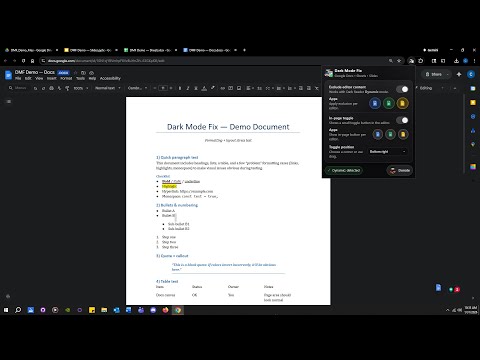
Fixes Dark Reader Dynamic in Google Docs/Sheets/Slides by excluding editor content. Optional in-page toggle.
Dark Reader’s Dynamic mode can look great on most sites, but it often breaks the look of Google Docs, Sheets, and Slides—inverted pages, strange colors, hard-to-read highlights, and inconsistent contrast. Dark Mode Fix for Google Docs / Sheets / Slides solves that by excluding the editor content surface (canvas/page/grid/slide) from Dark Reader’s Dynamic processing, so the editor stays readable while the surrounding UI can remain dark. Features Exclude editor content (per app) to prevent weird/inverted colors in Dynamic mode Optional in-page toggle (floating button inside the editor) Choose a toggle corner (and drag, if enabled) Lightweight and focused: does one job, clearly How to use Enable Dark Reader and set it to Dynamic mode (if that’s your preference). Open a Docs/Sheets/Slides editor and toggle Exclude editor content ON. (Optional) Enable the in-page toggle for quick access while you work. Privacy This extension does not sell or share data. It only stores your settings locally using Chrome’s extension storage. Disclaimer Not affiliated with or endorsed by Google or Dark Reader.
3 out of 58 ratings
Details
- Version1.0
- UpdatedFebruary 4, 2026
- Offered byBuddhaSante
- Size137KiB
- LanguagesEnglish
- Developer
Email
bonsante89@gmail.com - Non-traderThis developer has not identified itself as a trader. For consumers in the European Union, please note that consumer rights do not apply to contracts between you and this developer.
Privacy

This developer declares that your data is
- Not being sold to third parties, outside of the approved use cases
- Not being used or transferred for purposes that are unrelated to the item's core functionality
- Not being used or transferred to determine creditworthiness or for lending purposes