

Dark Browser
3 ratings
)
Overview
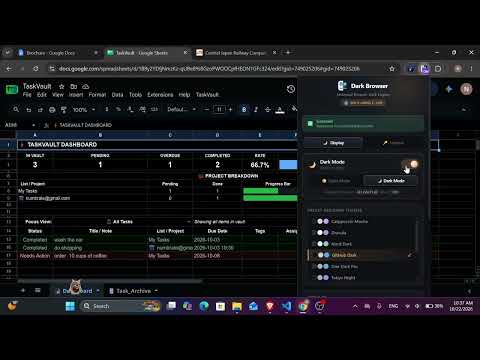
Reduce eye strain with instant dark mode for every website. Features 10 designer themes, site controls, and custom filters.
Bring instant dark mode to Chrome. Custom designer themes, site controls, custom brightness & zero white flashes. Dark Browser is a fast, lightweight dark mode extension that makes every website easy on the eyes. Whether you code late at night, read long articles, or just prefer a darker look, Dark Browser changes the whole web in one click. You don't need to set anything up first. 🌙 Instant dark mode for every website Dark Browser loads its styles before the page appears, so you never get a bright white flash. Dark Browser is optimized for Google Sheets™ and Google Docs™ for the best possible performance, while working seamlessly across all other websites, too. 🎨 10 designer dark themes Pick from developer-favourite color palettes instead of plain black and gray. 🧠 Two dark mode engines • Smart Dynamic Mode: inverts page colors but leaves photos, videos, canvas, icons and media looking normal. • Designer Palette Mode: applies your chosen theme's colors to every element, so the whole page looks consistent and polished. 🌐 Site-by-site controls Turn dark mode on for all websites or only for the domains you choose. Leave some sites in light mode and keep others dark. Your settings are saved for each site. 🎛 Custom brightness and display filters Adjust brightness, contrast, sepia and grayscale with live sliders. Use a warm sepia tone for night reading or lower the brightness to cut screen glare. ⚡ Switch light and dark instantly • One-click toggle and Light / Dark buttons in the popup • Right-click menu: toggle dark mode, switch to light or dark, or toggle the current domain • Keyboard shortcut: Alt + Shift + D (Cmd + Shift + D on Mac) ⚙️ Advanced options • Keep a website's original font colors • Keep a website's original background colors • Choose whether photos and media are inverted 👁 Why use dark mode? Dark mode can reduce eye strain, cut blue-light glare during night browsing, make reading more comfortable and save battery on OLED screens. It's a good fit for developers, students, writers, gamers and night owls. ✅ Works in Chrome, Microsoft Edge, Brave and other Chromium browsers. Built on Manifest V3. Install Dark Browser today and switch any website to dark mode in one click.
5 out of 53 ratings
Details
- Version1.0.4
- UpdatedOctober 23, 2026
- Size1.04MiB
- LanguagesEnglish
- Developer
Email
numbrate@gmail.com - Non-traderThis developer has not identified itself as a trader. For consumers in the European Union, please note that consumer rights do not apply to contracts between you and this developer.
Privacy

This developer declares that your data is
- Not being sold to third parties, outside of the approved use cases
- Not being used or transferred for purposes that are unrelated to the item's core functionality
- Not being used or transferred to determine creditworthiness or for lending purposes
Support
For help with questions, suggestions, or problems, visit the developer's support site