

VJster

Overview
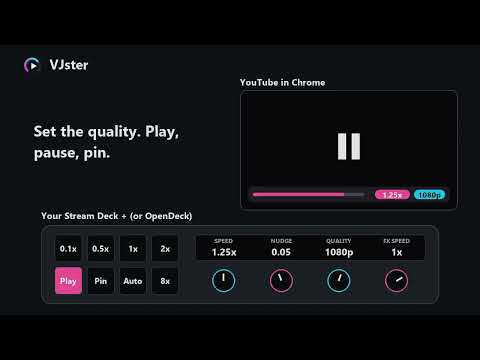
Control the speed and quality of the video in Chrome from Stream Deck, OpenDeck or TourBox. Talks only to VJster on this computer.
VJster lets the VJster dials and keys on your Stream Deck or OpenDeck change the speed and picture quality of a YouTube video: slow it for a beat-match, speed it up, nudge it in small steps, set the quality, play or pause. The deck shows the video's title and speed. VJster needs the free VJster plugin on your deck software (from https://github.com/jbrick2070/streamdeck-fadester). On its own, this extension does nothing. It talks only to your own computer. No account, no tracking, nothing sent to any server. Made with the help of AI (Claude, by Anthropic). The code is open source (GPL-2.0-or-later).
0 out of 5No ratings
Details
- Version0.1.2
- UpdatedNovember 7, 2026
- Offered byjbrick2070@gmail.com
- Size62.36KiB
- Languages12 languages
- DeveloperJeffrey A Brick
6401 Wilshire Blvd #810A Los Angeles, CA 90048 USEmail
jbrick2070@gmail.com - Non-traderThis developer has not identified itself as a trader. For consumers in the European Union, please note that consumer rights do not apply to contracts between you and this developer.
Privacy

This developer declares that your data is
- Not being sold to third parties, outside of the approved use cases
- Not being used or transferred for purposes that are unrelated to the item's core functionality
- Not being used or transferred to determine creditworthiness or for lending purposes
Support
For help with questions, suggestions, or problems, please open this page on your desktop browser