

Danmaku mini player - picture-in-picture video player
99 notas
)
Visão geral
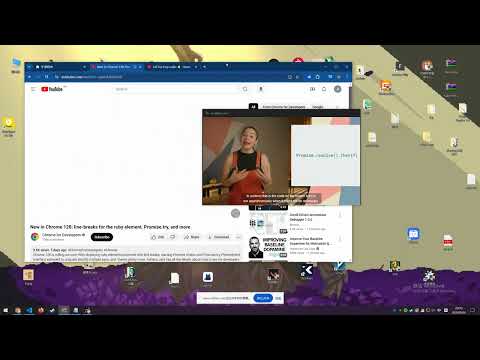
Enhanced picture in picture video player, support all video controls, subtitle, danmaku, change video in PIP sidebar, etc.
Adopt the latest picture-in-picture API functions for a better picture-in-picture playback experience. Click the plug-in icon, or move the mouse into the video and click the floating button in the upper left corner to pop up the picture in picture. Main functional features: ✅ Drag or keyboard to control the progress bar, volume, playback rate, etc. of the picture-in-picture window ✅ Danmaku playback and send - bilibili video + live broadcast - Douyu Live - Animation Crazy - Huya Live - youtube live broadcast - twitch live - Douyin Live ✅ Special feature support for Bilibili, YouTube, and Netflix - Video playback sidebar, you can directly switch playlists and recommended videos in picture-in-picture - Subtitle list of websites - Preview function of progress bar (Netflix does not support it yet) ✅ Support plug-in .xml .ass danmaku files - It also has the built-in function to download danmaku by entering the bilibili URL ✅ Subtitle function - Support .srt .ass plug-in function - Subtitle translation + bilingual function ✅ Long press the right button to double the speed, fast forward and backward frame by frame, screenshot and other functions + custom shortcut keys ✅ Replace web video player with video player with extension ✅ Supports most https websites, and even supports Crunchyroll, Youtube embedded videos ** If you have any questions, please go to https://github.com/apades/dmMiniPlayer/issues to submit the issue, do not mention it in the comments** * If you are using edge and the tab bar is red, it is recommended to upgrade your browser to 126.0.2592.102 or above * It is recommended to use Chrome 116 or above to support all the above functions * This plugin also supports local playback, but it is a bit irreversible 1. Right-click the plug-in in the plug-in bar and click [Manage Extensions] 2. Open [Allow access to file URL] 3. Drag the video into the browser to enable the picture-in-picture function ChangeLog: https://github.com/apades/dmMiniPlayer/blob/main/docs/changeLog.md
4,9 de 599 notas
Detalhes
- Versão0.6.63
- Atualização30 de setembro de 2026
- Oferecido porapad
- Tamanho479KiB
- Idiomas7 idiomas
- Desenvolvedor
E-mail
apad2@qq.com - Não negocianteEsse desenvolvedor não se identificou como comerciante. Caso você seja da União Europeia, observe que os direitos do consumidor não se aplicam a contratos firmados entre você e esse desenvolvedor.
Privacidade

O desenvolvedor declara que seus dados
- Não são vendidos a terceiros, exceto nos casos de uso aprovados
- Não são usados ou transferidos para fins não relacionados à função principal do item
- Não são usados ou transferidos para informações de crédito ou empréstimo
Suporte
Para receber ajuda com perguntas, sugestões ou problemas, abra esta página no seu navegador para computador