

Danmaku mini player - picture-in-picture video player
99 Bewertungen
)
Übersicht
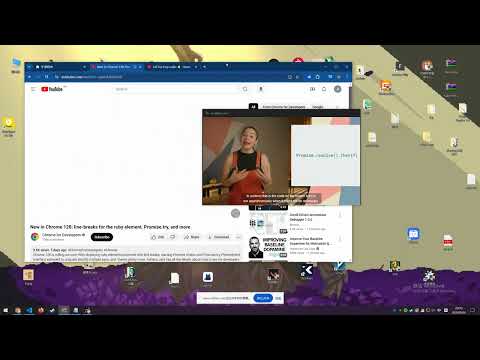
Enhanced picture in picture video player, support all video controls, subtitle, danmaku, change video in PIP sidebar, etc.
Adopt the latest picture-in-picture API functions for a better picture-in-picture playback experience. Click the plug-in icon, or move the mouse into the video and click the floating button in the upper left corner to pop up the picture in picture. Main functional features: ✅ Drag or keyboard to control the progress bar, volume, playback rate, etc. of the picture-in-picture window ✅ Danmaku playback and send - bilibili video + live broadcast - Douyu Live - Animation Crazy - Huya Live - youtube live broadcast - twitch live - Douyin Live ✅ Special feature support for Bilibili, YouTube, and Netflix - Video playback sidebar, you can directly switch playlists and recommended videos in picture-in-picture - Subtitle list of websites - Preview function of progress bar (Netflix does not support it yet) ✅ Support plug-in .xml .ass danmaku files - It also has the built-in function to download danmaku by entering the bilibili URL ✅ Subtitle function - Support .srt .ass plug-in function - Subtitle translation + bilingual function ✅ Long press the right button to double the speed, fast forward and backward frame by frame, screenshot and other functions + custom shortcut keys ✅ Replace web video player with video player with extension ✅ Supports most https websites, and even supports Crunchyroll, Youtube embedded videos ** If you have any questions, please go to https://github.com/apades/dmMiniPlayer/issues to submit the issue, do not mention it in the comments** * If you are using edge and the tab bar is red, it is recommended to upgrade your browser to 126.0.2592.102 or above * It is recommended to use Chrome 116 or above to support all the above functions * This plugin also supports local playback, but it is a bit irreversible 1. Right-click the plug-in in the plug-in bar and click [Manage Extensions] 2. Open [Allow access to file URL] 3. Drag the video into the browser to enable the picture-in-picture function ChangeLog: https://github.com/apades/dmMiniPlayer/blob/main/docs/changeLog.md
4,9 von 599 Bewertungen
Details
- Version0.6.63
- Aktualisiert30. September 2026
- Angeboten vonapad
- Größe479KiB
- Sprachen7 Sprachen
- Entwickler
E-Mail
apad2@qq.com - Kein HändlerDieser Entwickler hat sich nicht als Händler deklariert. Für Verbraucher in der Europäischen Union gelten die Verbraucherrechte nicht für Verträge, die zwischen dir und diesem Entwickler geschlossen werden.
Datenschutz

Dieser Entwickler erklärt, dass deine Daten
- nicht an Dritte verkauft werden, außer in den genehmigten Anwendungsfällen
- nicht für Zwecke genutzt oder übertragen werden, die nichts mit der Hauptfunktionalität des Artikels zu tun haben
- nicht zur Ermittlung der Kreditwürdigkeit oder für Darlehenszwecke verwendet oder übertragen werden
Support
Wenn du Hilfe bei Fragen, Vorschlägen oder Problemen benötigst, öffne diese Seite in deinem Desktop-Browser