

dance crab

Overview
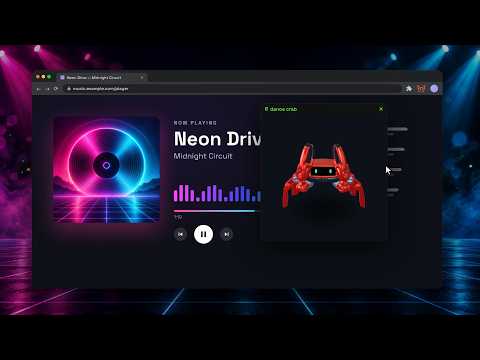
A robot crab dances in a small window on a tab playing music. That's all this tool does.
Watch 3D crab robots dance to the music playing in your browser tab. Click the extension icon on a music tab to open a movable square window. The crabs follow the rhythm while you continue using the page. Choose your dance and look - Eight dances: Bounce, Side step, Hey! Hey!, Wings, Go-go, Spin, Twist, and Up Up Down Down. - Automatic dance selection. - One to eight crabs, with adjustable motion sensitivity. - Five backgrounds: solid color, psychedelic, neon, spectrum ring, and spectrum tunnel. Move the window and explore the stage Drag the top bar to move the window. Drag the stage to change the camera angle, and use the mouse wheel to zoom. You can continue interacting with the page outside the window. Enjoy it without music Dance previews and tap tempo work without capturing tab audio. The interface supports Japanese and English. Audio stays on your device Audio from the tab you activate is analyzed locally to estimate tempo, beat position, and sound intensity. Audio, waveforms, and analysis results are not sent to external servers, and no recordings are created. Settings are stored locally. There is no login or advertising. Disconnect audio or close the last floating window or side panel to stop capture. Compatibility and rhythm adjustment Requires desktop Chrome 116 or later. Chrome internal pages and the Chrome Web Store use the side panel instead of an on-page window. Beat and tempo estimates may vary with the music. Use the half-beat shift, tap tempo, or tempo hold controls to adjust the rhythm. 3D model: Jumper Original by KingKongRobotics. Credits and licenses are available in the app.
0 out of 5No ratings
Details
- Version0.1.1
- UpdatedOctober 10, 2026
- Offered bygear machine
- Size2.36MiB
- LanguagesEnglish
- Developer
Email
grmchn4ml@gmail.com - Non-traderThis developer has not identified itself as a trader. For consumers in the European Union, please note that consumer rights do not apply to contracts between you and this developer.
Privacy

dance crab has disclosed the following information regarding the collection and usage of your data. More detailed information can be found in the developer's privacy policy.
dance crab handles the following:
This developer declares that your data is
- Not being sold to third parties, outside of the approved use cases
- Not being used or transferred for purposes that are unrelated to the item's core functionality
- Not being used or transferred to determine creditworthiness or for lending purposes
Support
For help with questions, suggestions, or problems, visit the developer's support site