

Daily Workspace — New Tab Dashboard
6 ratings
)
Overview
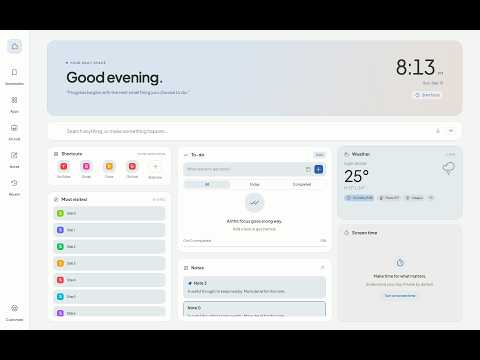
Your daily essentials in a bento dashboard. Organize tasks, notes and shortcuts, check the weather, and stay focused.
Make every new tab a useful place to start. Daily Workspace brings your everyday tools together in a customizable bento dashboard. Keep important websites close, organize tasks, capture ideas, and make time for focused work — and keep your tasks, notes and focus timer with you on the sites you actually work on. WHAT'S NEW • A bubble on every site — A small, muted handle on the edge of the pages you visit opens your tasks or pinned note, so you can add or tick off a to-do without leaving the page. It stays quiet until you point at it, sits under a site's own dialogs, hides in fullscreen, and never appears on sign-in or checkout pages. • Floating focus timer — A faint timer in the top-right corner of any site. One click starts a 25-minute session; while it runs you see a quiet progress ring with pause and resume. • Capture from any page — Keyboard shortcuts save the page you're on as a task, a note, or a shortcut, with a link back to where it came from. • A calmer dashboard — To-do and Notes as the large cards, the date, day progress and weather beside the clock, and smoother, more responsive interactions throughout. YOUR DAILY ESSENTIALS • Shortcuts and bookmarks — Access favorite websites, bookmarks, and your most visited pages, laid out to fit the space. Turn any frequently visited site into a shortcut with one click. • Tasks — Manage to-dos with due dates, daily or weekly repeats, and completion filters. • Notes — Capture thoughts in autosaving notes and pin important entries. • Focus timer — Start focused work sessions on any task, pause when needed, and take breaks. • Weather — See the current temperature and conditions at a glance; hover for feels-like, the day's high and low, and your location. • Screen time — See your browsing time by website, today or this week, compared with yesterday. • Saved workspaces — Save groups of tabs and reopen them together. • Quick access — Open your favorite web apps and recently closed tabs from the sidebar. SEARCH AND KEYBOARD • One search bar with your choice of search engine, plus suggestions and voice input. • Search also finds your own tasks and notes, open tabs, bookmarks and shortcuts. • Type @ to jump to a shortcut, t: to add a task, or b: to search bookmarks. • Keyboard shortcuts save the current page as a task, your selected text as a note, or the page as a shortcut, and another opens the dashboard with search ready. All of them can be remapped in your browser's extension shortcut settings. MAKE IT YOURS Rearrange dashboard cards, give any two of them extra height, show or hide tools, choose an accent color, and personalize your wallpaper. Use light mode, dark mode, or follow your browser's theme. Move the bubble to the left or right edge, hide it on specific sites, or switch it off entirely. BACKUP YOUR SETUP Export your dashboard data and restore it when needed. Import can merge with what you already have, so moving between browser profiles never duplicates your tasks or notes. No account or subscription is required. DATA AND PERMISSIONS Settings, tasks, notes, saved workspaces, and screen-time records are stored locally in your browser. Nothing is sent to us — there is no account and no server. • Access to the sites you visit is used only to show the tasks/note bubble and focus timer on those pages. The bubble displays your own tasks and notes; it does not read, collect, or send anything from the pages you visit. You can turn it off in Settings, or restrict site access from your browser's extension settings. • The capture shortcuts read the current page's title, address, and your selected text only when you press them, and save them locally. • Online features contact external services for weather, search suggestions, and website icons. • Optional permissions are requested only when you turn on features such as bookmarks, recently closed tabs, most visited sites, notifications, and screen-time tracking. Updating from an earlier version? Your browser will ask you to approve the new site access before the extension turns back on. Your tasks, notes, and settings are kept. Free and open source.
5 out of 56 ratings
Details
- Version0.3.1
- UpdatedOctober 14, 2026
- Offered byadhikari.saab03
- Size1.55MiB
- LanguagesEnglish
- Developer
Email
adhikari.saab03@gmail.com - Non-traderThis developer has not identified itself as a trader. For consumers in the European Union, please note that consumer rights do not apply to contracts between you and this developer.
Privacy

Daily Workspace — New Tab Dashboard has disclosed the following information regarding the collection and usage of your data. More detailed information can be found in the developer's privacy policy.
Daily Workspace — New Tab Dashboard handles the following:
This developer declares that your data is
- Not being sold to third parties, outside of the approved use cases
- Not being used or transferred for purposes that are unrelated to the item's core functionality
- Not being used or transferred to determine creditworthiness or for lending purposes