

D2R Trade Helper for Traderie

Overview
Unofficial. Grades D2R listing prices on Traderie, filters them by budget, and adds an optional AI copilot on your own OpenAI key.
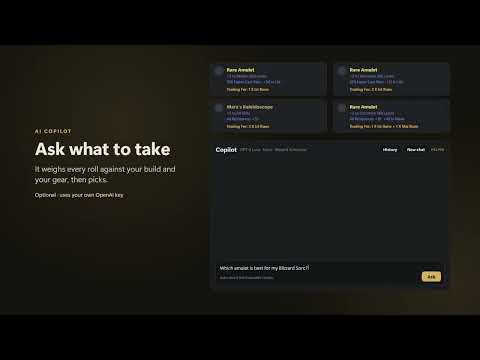
Unofficial helper for Diablo II: Resurrected trading on traderie.com. Not affiliated with, endorsed by or sponsored by Traderie or Blizzard Entertainment. COMPLETELY FREE No account, no subscription, no ads, no paid features. The optional AI copilot runs on your own OpenAI key, so you pay OpenAI directly and nothing to us: a question costs a fraction of a cent, and even heavy use comes to tens of cents. PRICE GRADES Every listing price on a D2R item page gets a grade against the median of the other prices in the same currency on the page: • Bargain: 10% or more under the median • Good: 2–10% under • Fair: about the median • Pricey: 8–20% over • Overpriced: more than 20% over Hover a grade for the cheapest, median and priciest price. Bundles and currencies with too few prices are marked instead of graded. Offers on your own listings read the other way: Generous, Good, Fair, Low, Lowball. PRICE FILTER Prices every listing in one unit you pick (Ist, Jah, a perfect gem…) through a bundled table of rune values, so listings asking for different currencies can be compared. Set a budget, keep only what you can pay for with your currencies, and "Show cheapest" jumps to the cheapest listing left. The toolbar button loads more pages of listings for you by pressing Traderie's own "Load more" button a few seconds apart. The extension never posts, messages, offers or trades for you. AI COPILOT (OPTIONAL) Ask in plain words, right on the Traderie page or in its own chat window: • "Ask AI for best offer": one click on the price filter, and the copilot picks the best listings for your character. It weighs every roll against your build and gear. A caster amulet with 10% faster cast rate can beat a pricier one with more skills, if it takes your Sorceress to her next cast breakpoint. It marks its picks on the page. • Your gear from screenshots: drop in your equipment and item tooltips, and it fills in every gear slot of your character. It marks what it can only guess from an icon. • What your stash is worth: drop in a stash screenshot, and it counts your runes and perfect gems and values them in Ist, Jah or any rune you pick. Correct any count by hand on the Wealth tab. • It asks you back when it needs to know something, and before loading more listings. • It remembers your characters (class, level, build, gear, mercenary), your stash and your conversations, in your browser. Every change it makes has Undo, and the settings list what it remembered, to correct or delete. PRIVACY The extension has no server and collects nothing. What it reads and keeps stays in your browser. Only the questions you ask the copilot go out, with the listings, character and screenshots each question needs, straight to OpenAI with your key. Settings → Privacy & data says exactly what is sent, and deletes everything, the key included. GETTING STARTED 1. Open a D2R item page on traderie.com: the grades and the price filter appear by themselves. 2. Optional: to use the copilot, add a few dollars of API credit at platform.openai.com (a ChatGPT subscription doesn't include the API), create a key, and paste it in Settings → AI copilot. 3. Questions? The FAQ page is in the extension: toolbar button → FAQ. See it in action: https://youtu.be/KW6nss_tbJc https://youtu.be/4Uysg41Nxxo https://youtu.be/yh9WkdnUMuw
0 out of 5No ratings
Details
- Version0.16.0
- UpdatedOctober 8, 2026
- Size132KiB
- LanguagesEnglish
- Developer
Email
tkachenkoas@gmail.com - Non-traderThis developer has not identified itself as a trader. For consumers in the European Union, please note that consumer rights do not apply to contracts between you and this developer.
Privacy

This developer declares that your data is
- Not being sold to third parties, outside of the approved use cases
- Not being used or transferred for purposes that are unrelated to the item's core functionality
- Not being used or transferred to determine creditworthiness or for lending purposes