

CyberPrivacy

Overview
Shows and blocks what websites take from you and warns you about dangerous ones.
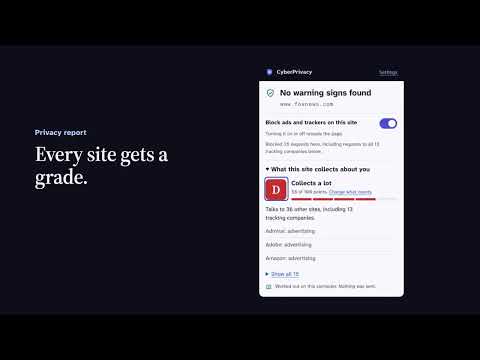
CyberPrivacy does three things while you browse: it warns you about pages that look dangerous, it blocks ads and trackers, and it shows you what each site you visit is taking from you. WARNINGS ABOUT RISKY SITES - Every page address and every link on a page is checked on your computer for common tricks: fake brand names, look-alike domains, raw IP addresses and similar signs of phishing. - Risky links are marked on the page. A link that looks dangerous opens a warning first, and you can still choose to continue. - Optionally, you can turn on online checks against two public lists of known dangerous sites: Google Safe Browsing and URLhaus (abuse.ch). These are off until you turn them on. No list is complete, so a dangerous site can be missed and a safe site can be flagged by mistake. BLOCKING ADS AND TRACKERS - Blocking uses rules converted from EasyList and EasyPrivacy, built into the extension and applied by Chrome. Nothing is sent anywhere for blocking. - You can turn blocking off for a single site from the toolbar popup, and undo that in Settings. THE PRIVACY REPORT - Click the toolbar icon to see which other companies a page contacts, how many of its requests were blocked, whether it keeps cookies in your browser, which of camera, microphone, location and notifications you have allowed it, and whether its password or email forms send data to another site or use an unencrypted connection. - The page gets a grade from A to F. In Settings you can change how much each kind of data-taking counts against the grade. - An optional detector, off by default, can name sites that try to recognise your browser by fingerprinting it with the canvas. While it is on, websites can tell that CyberPrivacy is installed. - The report is built on your computer and kept only in the browser's session storage for that tab. It is deleted when you close the tab or the browser. WHAT LEAVES YOUR COMPUTER By default, nothing. Online checks are off until you choose to turn them on from the screen that opens when you install the extension (you can change the choice at any time in the extension's settings). If you turn them on: - Google Safe Browsing: for each page you open, the address is hashed on your computer and only the first 4 bytes of each hash are sent, through CyberPrivacy's proxy server, to Google. The address itself is never sent. For very popular sites a fragment can hint at which site was checked. - URLhaus: about once an hour your computer downloads the public list of malware addresses, through the same proxy, and matches pages and links against it locally. Nothing about your browsing is sent. - The proxy holds the API keys and forwards the requests. It does not store what you look up. Like any web server it sees your IP address while it answers a request. Your data is used only to show you warnings and the privacy report. It is not sold, not used for advertising, and not shared except as described above. The full privacy policy is linked on this page. CREDITS Blocking rules come from EasyList and EasyPrivacy (CC BY-SA 3.0). The list of tracking companies is adapted from Disconnect's tracker protection list (CC BY-NC-SA 4.0). Google Safe Browsing advisory provided by Google. URLhaus is a project of abuse.ch.
0 out of 5No ratings
Details
- Version0.5.0
- UpdatedNovember 22, 2026
- Size1.54MiB
- LanguagesEnglish
- Developer
Email
dongyeop0810@gmail.com - Non-traderThis developer has not identified itself as a trader. For consumers in the European Union, please note that consumer rights do not apply to contracts between you and this developer.
Privacy

CyberPrivacy has disclosed the following information regarding the collection and usage of your data. More detailed information can be found in the developer's privacy policy.
CyberPrivacy handles the following:
This developer declares that your data is
- Not being sold to third parties, outside of the approved use cases
- Not being used or transferred for purposes that are unrelated to the item's core functionality
- Not being used or transferred to determine creditworthiness or for lending purposes