

Cut Last Frame - Extract the last frame in HD and keep creating.

Overview
Extract the last frame from any AI-generated video as PNG — perfect for seamless AI video workflows.
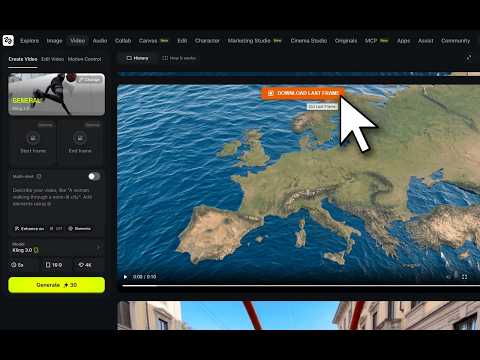
Extract the last frame of any AI video as PNG with one click. Perfect for seamless AI video generation workflows across today’s leading creative platforms. If you create AI videos, you know the drill: generate a clip, then spend minutes downloading it, opening a video editor, scrubbing to the last frame, and exporting it as an image. Cut Last Frame eliminates all of that. Hover over any active AI-generated video on the page. An orange button appears. Click it. The last frame is instantly saved as a high-resolution PNG, ready to use as the starting image for your next generation. No video editor. No downloads. No external services. It all happens directly in your browser. What you get: • One-click extraction of the last frame from any AI-generated video • Full-resolution PNG, with no compression or quality loss • Designed for the leading AI video generation platforms, image-to-video tools, cinematic AI studios, creative enhancement suites, and browser-based production workflows • More platform support added regularly • Simple hover-and-click interface, with no settings to configure Privacy & permissions: Cut Last Frame only accesses the video element you hover on. It does not track your activity, collect personal data, or communicate with external servers. The frame is extracted entirely locally in your browser and downloaded directly to your device. Try it free for 7 days, no payment required. A one-time lifetime license is available for €1.99. No subscription, no recurring charges. Add Cut Last Frame and make your AI video workflow seamless, clip after clip.
5 out of 54 ratings
Details
- Version1.1
- UpdatedMay 20, 2026
- FeaturesOffers in-app purchases
- Size59.67KiB
- Languages18 languages
- DeveloperWebsite
Email
openspaces2023@gmail.com - Non-traderThis developer has not identified itself as a trader. For consumers in the European Union, please note that consumer rights do not apply to contracts between you and this developer.
Privacy

This developer declares that your data is
- Not being sold to third parties, outside of the approved use cases
- Not being used or transferred for purposes that are unrelated to the item's core functionality
- Not being used or transferred to determine creditworthiness or for lending purposes
Support
For help with questions, suggestions, or problems, visit the developer's support site