

Custro LinkedIn Assistant
1 rating
)
Overview
AI writing assistant for LinkedIn job seekers — drafts posts, comments, outreach. User-initiated only; nothing sent automatically.
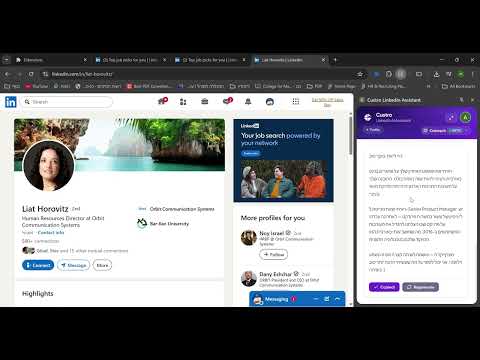
Custro LinkedIn Assistant Finding a job on LinkedIn is not just about applying. It is about writing the right message, staying visible, following up correctly, and keeping track of everything. Custro is an AI-powered LinkedIn assistant built for job seekers. It lives inside Chrome’s side panel and helps you write better, apply faster, and stay organized without leaving LinkedIn. Whether you are sending a message to a recruiter, writing a LinkedIn post, or tracking your applications, Custro keeps everything in one place. What Custro helps you do: *Write better recruiter outreach messages Stop wasting time rewriting the same message over and over. Custro generates personalized recruiter and hiring manager messages based on the job you are viewing, your goals, and your tone. *Create LinkedIn posts and comments in seconds Staying active on LinkedIn is one of the best ways to increase profile views and attract opportunities, but most job seekers struggle with what to write. Custro helps you generate posts and thoughtful comments that sound natural, relevant, and professional. You can review everything, tweak it to match your voice, and paste it into LinkedIn. *Improve your LinkedIn profile with clear feedback Upload your LinkedIn profile PDF and receive actionable AI suggestions to improve your headline, summary, experience section, and more. This makes it easier to present yourself professionally and increase your chances of getting noticed by recruiters. *Track your job application with one click Custro includes a simple application tracker that helps you stay organized across your entire job search. Track where you applied, what stage you are in, and what to follow up on next. Everything stays private and is synced through your Custro account across devices. *Designed for a clean LinkedIn experience Custro runs in Chrome’s side panel. It does not inject buttons, popups, or overlays into LinkedIn. It is designed to be minimal, fast, and easy to use. *Privacy and user control Custro is built with privacy in mind and gives you full control. It does not send messages automatically. It does not automate LinkedIn actions. It does not access your LinkedIn credentials. It does not read your private LinkedIn messages. All AI-generated content is shown to you first. You decide what to copy, edit, and send. *Why job seekers install Custro Because applying for jobs takes time, and writing takes even longer. Custro helps you move faster while still sounding professional and confident. Instead of spending hours rewriting messages and trying to stay organized, you can focus on what matters. Finding the right opportunities and getting hired. Install Custro, sign in, open the side panel, and start using AI to make your LinkedIn job search easier.
5 out of 51 rating
Details
- Version1.0.2
- UpdatedAugust 1, 2026
- FeaturesOffers in-app purchases
- Offered bycustro.dev
- Size141KiB
- LanguagesEnglish
- Developer
Email
custro.dev@gmail.com - Non-traderThis developer has not identified itself as a trader. For consumers in the European Union, please note that consumer rights do not apply to contracts between you and this developer.
Privacy

Custro LinkedIn Assistant has disclosed the following information regarding the collection and usage of your data. More detailed information can be found in the developer's privacy policy.
Custro LinkedIn Assistant handles the following:
This developer declares that your data is
- Not being sold to third parties, outside of the approved use cases
- Not being used or transferred for purposes that are unrelated to the item's core functionality
- Not being used or transferred to determine creditworthiness or for lending purposes
Support
For help with questions, suggestions, or problems, visit the developer's support site