


概要
Track and debug CustomerLabs events on your website
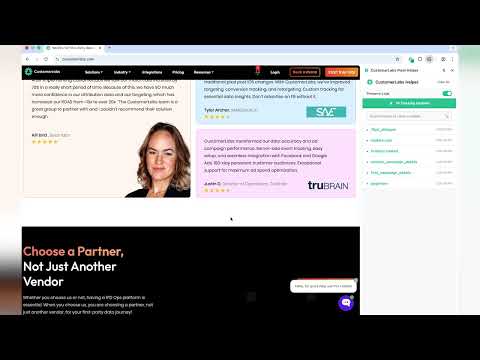
CustomerLabs Pixel Helper helps you track, inspect, and debug CustomerLabs events fired from your website—so you can quickly verify your implementation and fix issues before they impact reporting. What it does Detects CustomerLabs events on the current page in real time Shows event name, timestamp, and key properties (payload) Flags common issues with clear warnings and errors (missing/invalid fields, malformed payloads, duplicate fires, etc.) Helps confirm the right events are firing on the right pages (e.g., signup, purchase, lead) Why you’ll want it Validate your CustomerLabs setup during development and QA Troubleshoot mismatched numbers by ensuring events are firing correctly Catch mistakes early (wrong event names, incorrect parameters, multiple fires) How to use Install the extension Open your website and perform the action you want to test Click the extension to view detected CustomerLabs events and any warnings Privacy CustomerLabs Pixel Helper is a debugging tool and is intended to help you inspect events locally while you test.
5 点満点で 51 件の評価
詳細
プライバシー

このデベロッパーは、お客様のデータについて以下を宣言しています
- 承認されている以外の用途で第三者に販売しないこと
- アイテムの中心機能と関係のない目的で使用または転送しないこと
- 信用力を判断する目的または融資目的で使用または転送しないこと
サポート
質問や提案、問題がある場合は、パソコンのブラウザでこのページを開いてください