


Overview
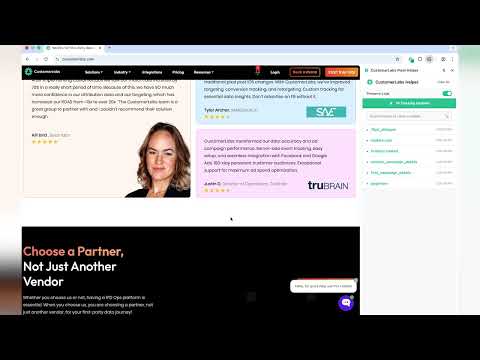
Track and debug CustomerLabs events on your website
CustomerLabs Pixel Helper helps you track, inspect, and debug CustomerLabs events fired from your website—so you can quickly verify your implementation and fix issues before they impact reporting. What it does Detects CustomerLabs events on the current page in real time Shows event name, timestamp, and key properties (payload) Flags common issues with clear warnings and errors (missing/invalid fields, malformed payloads, duplicate fires, etc.) Helps confirm the right events are firing on the right pages (e.g., signup, purchase, lead) Why you’ll want it Validate your CustomerLabs setup during development and QA Troubleshoot mismatched numbers by ensuring events are firing correctly Catch mistakes early (wrong event names, incorrect parameters, multiple fires) How to use Install the extension Open your website and perform the action you want to test Click the extension to view detected CustomerLabs events and any warnings Privacy CustomerLabs Pixel Helper is a debugging tool and is intended to help you inspect events locally while you test.
5 out of 52 ratings
Details
- Version1.0.0
- UpdatedJanuary 26, 2026
- Size48.69KiB
- LanguagesEnglish (United States)
- DeveloperCustomerLabs, INCWebsite
131 Continental Dr Suite 305 Newark, DE 19713-4324 USEmail
developers@customerlabs.coPhone
+91 91764 68381 - TraderThis developer has identified itself as a trader per the definition from the European Union and committed to only offer products or services that comply with EU laws.
Privacy

This developer declares that your data is
- Not being sold to third parties, outside of the approved use cases
- Not being used or transferred for purposes that are unrelated to the item's core functionality
- Not being used or transferred to determine creditworthiness or for lending purposes
Support
For help with questions, suggestions, or problems, please open this page on your desktop browser