


Pregled
Easy way to change youtube video playback speed
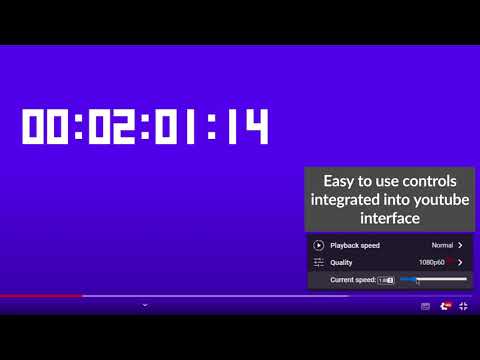
Chrome extension that enables changing YouTube video playback speed from 0 to 10 with a custom step. The controls are integrated with the YouTube player in the form of: - a draggable bar below the quality option in the player settings, - numeric input - by detecting pressed keys provided by the user (by default '-' or 'a' to subtract and '+' or 'd' to add). New dynamic playback speed control in version 1.6.0! The feature of dynamic video playback speed enables the playback speed to begin at a specified rate and then gradually increase until it reaches the desired rate at the specified duration percentage. It has to be enabled in a settings! Source code: https://github.com/MarekNowak250/Change-youtube-playback-speed-chrome-extension Have any improvement suggestion? You can create an issue here: https://github.com/MarekNowak250/Change-youtube-playback-speed-chrome-extension/issues
4,3 od 57 ocjena
Pojedinosti
- Verzija1.6.1
- Ažurirano29. srpnja 2024.
- PonuditeljPH03NIX Software
- Veličina179KiB
- JeziciEnglish
- Razvojni programer
E-pošta
AndrzejKrzakuKrzakowski@gmail.com - NetrgovacOvaj razvojni programer nije se identificirao kao trgovac. Ako ste potrošač u Europskoj uniji, imajte na umu da se potrošačka prava ne primjenjuju na ugovore između vas i tog razvojnog programera.
Privatnost

Ovaj razvojni programer izjavljuje da se vaši podaci
- ne prodaju se trećim stranama, osim u odobrenim scenarijima upotrebe
- Ne koriste se i ne prenose u svrhe koje nisu povezane s osnovnom funkcijom artikla.
- Ne koriste se i ne prenose radi utvrđivanja kreditne sposobnosti ili davanja zajmova.
Podrška
Za pomoć u vezi s pitanjima, prijedlozima ili problemima otvorite ovu stranicu u računalnom pregledniku