

Custom Web Background - Add Wallpaper to Any Websites!

Overview
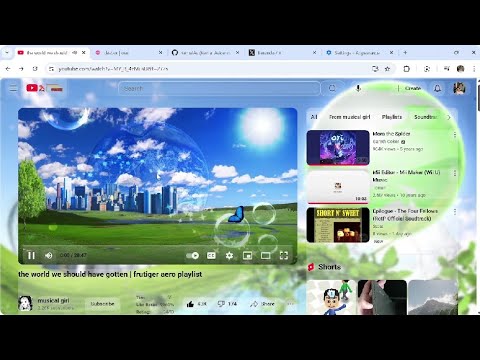
Tired of boring plain pages? This extension lets you add your own wallpaper behind every website you visit.
Universal Media Support - Upload your own local images (JPG, PNG, GIF) or animated looping videos (MP4). - Paste any direct image/video URL from the web. 3 Smart Transparency Modes - None Transparent: Preserves original website containers while displaying your wallpaper in outer page margins for 100% original contrast. - Glass UI: Modern frosted-glass aesthetic with gentle backdrop blur, allowing wallpapers to shine softly through containers while keeping text legible. - Transparent: Full container transparency for an unobstructed, edge-to-edge wallpaper experience. Target Websites Filtering (Up to 10 Sites) - Choose between "All Websites" or restrict wallpapers to specific domains. - Convenient "+ Add Current Website" button detects your active tab in 1 click. - Manage up to 10 specific websites with quick removal chips. Eye-Care Defaults & Custom Controls - Default (Vivid & Clear): Blur 0px • Dim 75% - Eye-Care Preset: Blur 5px • Dim 75% (softens background clutter to reduce eye strain during long reading sessions) - Deep Focus Preset: Blur 25px • Dim 50% (creates a gentle bokeh background to keep your attention on tasks) - Custom Sliders: Real-time slider control for Blur (0px–30px) and Dimming (0%–100%). Adaptive Theme Colors (Auto Mode) - In Auto mode, overlay dimming automatically adopts your custom Dark Theme Color or Light Theme Color based on your system or website's active dark/light mode. Privacy-First - All images, videos, and settings stay 100% local on your machine via Chrome Storage. - No analytics, no tracking, and no external data collection. QUICK START GUIDE 1. Click the extension icon in your Chrome toolbar (pin it via the 🧩 Puzzle icon for quick 1-click access). 2. Choose your background image or MP4 video via "Choose File..." or paste an image URL. 3. Select your preferred Transparent Mode (None Transparent, Glass UI, or Transparent). 4. Choose an instant preset or adjust the Blur and Dim sliders to your comfort. 5. Click "Apply & Save" to enjoy your personalized web experience across all tabs!
4.8 out of 513 ratings
Details
- Version3.76
- UpdatedOctober 30, 2026
- Size808KiB
- LanguagesEnglish (United States)
- DeveloperWebsite
Email
trixieabu@gmail.com - Non-traderThis developer has not identified itself as a trader. For consumers in the European Union, please note that consumer rights do not apply to contracts between you and this developer.
Privacy

This developer declares that your data is
- Not being sold to third parties, outside of the approved use cases
- Not being used or transferred for purposes that are unrelated to the item's core functionality
- Not being used or transferred to determine creditworthiness or for lending purposes
Support
For help with questions, suggestions, or problems, please open this page on your desktop browser