


Tổng quan
Easily set a custom zoom level for each website (or all websites)
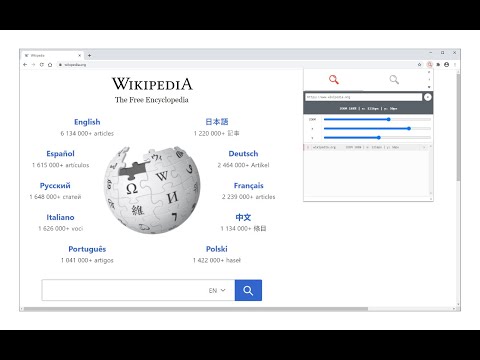
Custom Page Zoom extension lets you set separate zoom levels for each website. Besides, you can set the X and Y positions for each page. Some features: 1. Add custom zoom levels for each website easily from the browser's toolbar popup window. 2. Set X and Y positions for each page. 3. Save button stores the settings for individual pages. 4. You can delete each setting from the toolbar popup window by clicking on the close (x) button. 5. There is also an option to set a zoom level for all websites by adding "*" instead of a "URL". 6. To quickly turn the Addon ON or OFF, there are two separate buttons at the popup UI, top section. To add a custom zoom level, (a) simply open the toolbar popup UI, (b) change the zoom slider to adjust the magnifying scale, (c) then change the other two sliders for X and Y positions, (d) and finally click on the add (+) button. The settings will be saved for the page you selected (the URL for each page will be automatically added to the popup UI once you open it, however, you can change it to your desired value). Note: to report bugs, please visit the addon's homepage (https://mybrowseraddon.com/custom-page-zoom.html) and fill the bug report form.
4,0/562 lượt xếp hạng
Chi tiết
- Phiên bản0.2.0
- Đã cập nhật6 tháng 1, 2026
- Nhà cung cấpGrephy
- Kích thước43.92KiB
- Ngôn ngữEnglish
- Nhà phát triển
Email
grephyr.prj@gmail.com - Người bán phi thương mạiNhà phát triển này không tự nhận mình là người bán. Đối với người tiêu dùng ở Liên minh Châu Âu, xin lưu ý rằng các quyền của người tiêu dùng không được áp dụng trong hợp đồng giữa bạn và nhà phát triển này.
Quyền riêng tư

Nhà phát triển này tuyên bố rằng dữ liệu của bạn
- Không được bán cho bên thứ ba, ngoài những trường hợp sử dụng đã được phê duyệt
- Không được sử dụng hoặc chuyển nhượng cho các mục đích không liên quan đến chức năng chính của mặt hàng
- Không được sử dụng hoặc chuyển nhượng để xác định khả năng thanh toán nợ hoặc phục vụ mục đích cho vay
Hỗ trợ
Nếu bạn có câu hỏi, ý kiến đề xuất hoặc gặp vấn đề, hãy truy cập trang web hỗ trợ của nhà phát triển để được trợ giúp