


Genel bakış
Easily set a custom zoom level for each website (or all websites)
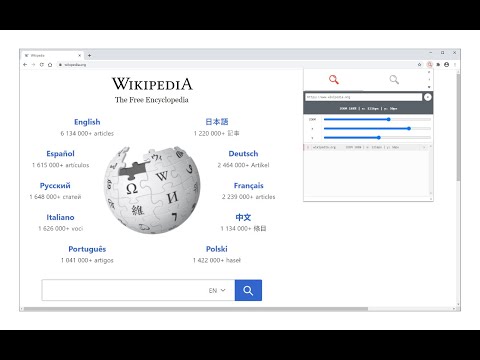
Custom Page Zoom extension lets you set separate zoom levels for each website. Besides, you can set the X and Y positions for each page. Some features: 1. Add custom zoom levels for each website easily from the browser's toolbar popup window. 2. Set X and Y positions for each page. 3. Save button stores the settings for individual pages. 4. You can delete each setting from the toolbar popup window by clicking on the close (x) button. 5. There is also an option to set a zoom level for all websites by adding "*" instead of a "URL". 6. To quickly turn the Addon ON or OFF, there are two separate buttons at the popup UI, top section. To add a custom zoom level, (a) simply open the toolbar popup UI, (b) change the zoom slider to adjust the magnifying scale, (c) then change the other two sliders for X and Y positions, (d) and finally click on the add (+) button. The settings will be saved for the page you selected (the URL for each page will be automatically added to the popup UI once you open it, however, you can change it to your desired value). Note: to report bugs, please visit the addon's homepage (https://mybrowseraddon.com/custom-page-zoom.html) and fill the bug report form.
5 üzerinden 4,063 puan
Ayrıntılar
- Sürüm0.2.0
- Güncellenme tarihi:6 Ocak 2026
- Sunan:Grephy
- Boyut43.92KiB
- DillerEnglish
- Geliştirici
E-posta
grephyr.prj@gmail.com - Tacir olmayanBu yayıncı kendisini tacir olarak tanımlamamış. Avrupa Birliği'ndeki tüketiciler açısından bakıldığında, bu geliştiriciyle yapmış olduğunuz sözleşmelerde tüketici haklarının geçerli olmadığını lütfen unutmayın.
Gizlilik

Bu geliştirici, verilerinizle ilgili olarak aşağıdakileri beyan eder:
- Onaylanan kullanım alanları dışında üçüncü taraflara satılmaz
- Öğenin temel işleviyle alakasız amaçlar için kullanılmaz ya da aktarılmaz
- Kredibilitenin belirlenmesi veya borç verme amaçlarıyla kullanılmaz ya da aktarılmaz
Destek
Sorular, öneriler veya sorunlarla ilgili yardım için geliştiricinin destek sitesini ziyaret edin.