


Ringkasan
Easily set a custom zoom level for each website (or all websites)
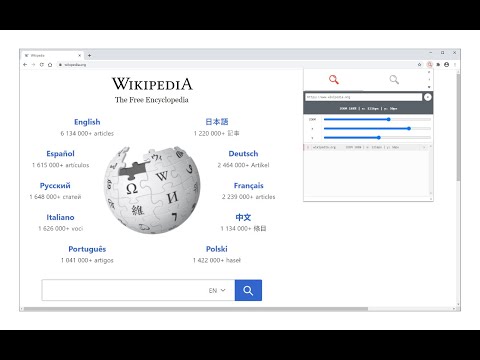
Custom Page Zoom extension lets you set separate zoom levels for each website. Besides, you can set the X and Y positions for each page. Some features: 1. Add custom zoom levels for each website easily from the browser's toolbar popup window. 2. Set X and Y positions for each page. 3. Save button stores the settings for individual pages. 4. You can delete each setting from the toolbar popup window by clicking on the close (x) button. 5. There is also an option to set a zoom level for all websites by adding "*" instead of a "URL". 6. To quickly turn the Addon ON or OFF, there are two separate buttons at the popup UI, top section. To add a custom zoom level, (a) simply open the toolbar popup UI, (b) change the zoom slider to adjust the magnifying scale, (c) then change the other two sliders for X and Y positions, (d) and finally click on the add (+) button. The settings will be saved for the page you selected (the URL for each page will be automatically added to the popup UI once you open it, however, you can change it to your desired value). Note: to report bugs, please visit the addon's homepage (https://mybrowseraddon.com/custom-page-zoom.html) and fill the bug report form.
4,0 dari 563 rating
Detail
- Versi0.2.0
- Diupdate6 Januari 2026
- Ditawarkan olehGrephy
- Ukuran43.92KiB
- BahasaEnglish
- Developer
Email
grephyr.prj@gmail.com - Non-pedagangDeveloper ini tidak mengidentifikasi diri sebagai pedagang. Bagi konsumen di Uni Eropa, perlu diperhatikan bahwa hak konsumen tidak berlaku untuk kontrak antara Anda dan developer ini.
Privasi

Developer ini menyatakan bahwa data Anda
- Tidak dijual ke pihak ketiga, di luar kasus penggunaan yang disetujui
- Tidak digunakan atau ditransfer untuk tujuan yang tidak terkait dengan fungsi inti item
- Tidak digunakan atau ditransfer untuk menentukan kelayakan kredit atau untuk tujuan pinjaman
Dukungan
Untuk mendapatkan bantuan terkait pertanyaan, saran, atau masalah, kunjungi situs dukungan developer