


Descripción general
Easily set a custom zoom level for each website (or all websites)
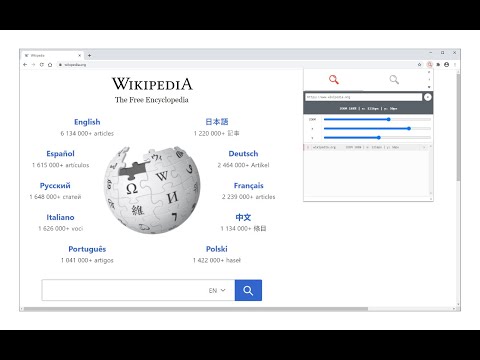
Custom Page Zoom extension lets you set separate zoom levels for each website. Besides, you can set the X and Y positions for each page. Some features: 1. Add custom zoom levels for each website easily from the browser's toolbar popup window. 2. Set X and Y positions for each page. 3. Save button stores the settings for individual pages. 4. You can delete each setting from the toolbar popup window by clicking on the close (x) button. 5. There is also an option to set a zoom level for all websites by adding "*" instead of a "URL". 6. To quickly turn the Addon ON or OFF, there are two separate buttons at the popup UI, top section. To add a custom zoom level, (a) simply open the toolbar popup UI, (b) change the zoom slider to adjust the magnifying scale, (c) then change the other two sliders for X and Y positions, (d) and finally click on the add (+) button. The settings will be saved for the page you selected (the URL for each page will be automatically added to the popup UI once you open it, however, you can change it to your desired value). Note: to report bugs, please visit the addon's homepage (https://mybrowseraddon.com/custom-page-zoom.html) and fill the bug report form.
4,0 de 563 valoraciones
Detalles
- Versión0.2.0
- Actualizado6 de enero de 2026
- Ofrecido porGrephy
- Tamaño43.92KiB
- IdiomasEnglish
- Desarrollador
Correo electrónico
grephyr.prj@gmail.com - No operadorEste desarrollador no se ha identificado como operador. Los consumidores residentes en la Unión Europea deben tener en cuenta que los derechos de los consumidores no son aplicables a los contratos que suscriban con este desarrollador.
Privacidad

Este desarrollador declara que tus datos:
- No se venden a terceros, excepto en los casos de uso aprobados
- No se usan ni se transfieren para fines no relacionados con la función principal del elemento.
- No se usan ni se transfieren para determinar la situación crediticia ni para ofrecer préstamos.
Ayuda
Si tienes alguna pregunta, sugerencia o problema, visita el sitio de asistencia del desarrollador.