

Custom home page

Overview
A calm new tab: daily photo, your links, focus, tasks, notes, Pomodoro, weather and calendar. No accounts, no tracking.
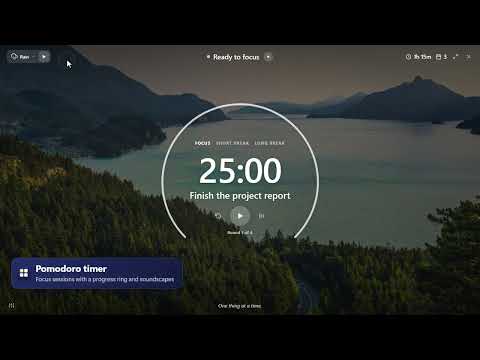
Custom home page turns Chrome's New Tab page into a calm, personal start page — and keeps your data in your browser. NEW IN 2.0 • A beautiful landscape photo every day (357 hand-picked, works offline), with favorites and a "next photo" button. • Three pages, one click apart: Links, Focus and Pomodoro. • A greeting with your name and one main focus for the day. • Tasks with lists, due dates and subtasks, and quick Notes. • A Pomodoro timer with a full-screen focus view and calming soundscapes (rain, thunderstorm, ocean, wind, fireplace, brown noise). • Weather with a 5-day forecast, world clocks, and a quote of the day. • Your next calendar events (Google, Outlook or iCloud, read-only by iCal link). • Themes: fonts, light or dark panels, accent and text colors. • Settings follow you to your other computers through Chrome sync. STILL HERE FROM 1.x • Your links one click away: lines of tiles (up to 4 × 8) with favicons, emoji or your own icons, named lines, drag and drop. • A search bar that uses your browser's search engine (or Google, Bing, DuckDuckGo, Ecosia, Brave) and opens typed addresses directly. • Your own background: an image, an image link, a color or a gradient. • A big clock with 12/24-hour time and your choice of date format. • 17 languages. PRIVATE BY DESIGN • No accounts, no sign-in, no analytics, no tracking. • Your links, tasks and notes stay in your browser; settings follow your Chrome profile through Chrome sync. • Optional permissions (notifications, a calendar's website) are asked only when you use those features. UPDATING FROM 1.x Your links, background, clock format and line styles come along automatically, and a short tour shows what's new. TIP: Right-click anywhere on the page to open the settings.
0 out of 5No ratings
Details
- Version2.0
- UpdatedOctober 19, 2026
- Size1.26MiB
- Languages17 languages
- Developer
Email
mnosov88@gmail.com - Non-traderThis developer has not identified itself as a trader. For consumers in the European Union, please note that consumer rights do not apply to contracts between you and this developer.
Privacy

Custom home page has disclosed the following information regarding the collection and usage of your data. More detailed information can be found in the developer's privacy policy.
Custom home page handles the following:
This developer declares that your data is
- Not being sold to third parties, outside of the approved use cases
- Not being used or transferred for purposes that are unrelated to the item's core functionality
- Not being used or transferred to determine creditworthiness or for lending purposes