


Overview
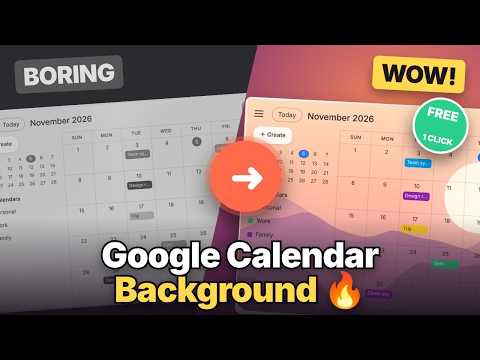
Put your own photos, monthly images or colors behind Google Calendar. Matches light and dark mode automatically.
🎨 Custom Calendar Background — make Google Calendar truly yours Tired of the plain white calendar? Custom Calendar Background puts your own photo, a different image for every month, or a soft color gradient behind Google Calendar — while your events stay sharp and easy to read. It's the simple Google Calendar background changer you've been looking for. 🖼️ FREE FEATURES ✅ Your own Google Calendar background — drag & drop any photo or paste an image link 🌈 Colors and smooth gradients 🌙 Automatic light & dark mode — matches Google Calendar's theme on its own 👓 Readability layer and blur controls, so busy photos never hide your events ⚡ A quick panel right inside Calendar's top bar — change your background in one click ⭐ PRO FEATURES 📅 Monthly images — a new Google Calendar theme for every month of the year 🔄 Daily rotation — up to 30 images, a fresh view every day, in the order you choose 🔢 See exactly which day each image appears ("Today", "Tomorrow", dates) 💻 Works on all your computers — linked to your Google account 🎁 EARLY ACCESS The first 100 people who sign in get Pro FREE for a full year. No credit card, nothing to cancel. 🔒 PRIVATE BY DESIGN 🛡️ Your photos never leave your browser — stored locally, never uploaded 📍 Runs only on calendar.google.com and cannot read your events 🚫 No ads, no tracking 🌍 Available in 55 languages 🚀 HOW TO USE THIS CALENDAR BACKGROUND CUSTOMIZER 1️⃣ Click "Add to Chrome" 2️⃣ Open Google Calendar 3️⃣ Click the round icon in the top bar and choose your background Whether you want a calm photo, seasonal Google Calendar themes, or a clean dark mode setup, Custom Calendar Background turns your schedule into something you actually enjoy looking at. ✨ 🌐 Website & guide: https://customcalendarbackground.com 💬 Support: support@customcalendarbackground.com Google Calendar is a trademark of Google LLC. This extension is independent and not affiliated with or endorsed by Google.
0 out of 5No ratings
Details
- Version1.0.1
- UpdatedNovember 6, 2026
- Size172KiB
- Languages55 languages
- DeveloperBackDropWebsite
21 Royalty St Williamstown, WV 26187-8011 USEmail
support@customcalendarbackground.com - Non-traderThis developer has not identified itself as a trader. For consumers in the European Union, please note that consumer rights do not apply to contracts between you and this developer.
Privacy

This developer declares that your data is
- Not being sold to third parties, outside of the approved use cases
- Not being used or transferred for purposes that are unrelated to the item's core functionality
- Not being used or transferred to determine creditworthiness or for lending purposes
Support
For help with questions, suggestions, or problems, please open this page on your desktop browser