

CueBack — YouTube Scroll Seek

Overview
Seek YouTube videos with your scroll wheel. Hold a key or toggle seeking, then replay your saved position instantly.
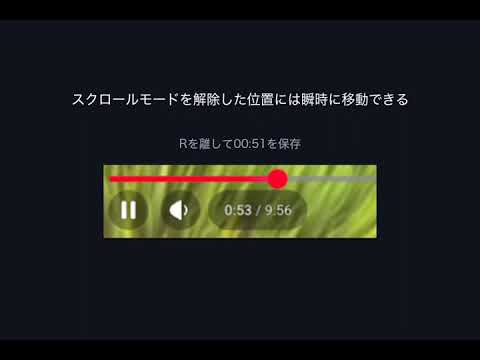
Scroll to seek. Return to your saved position instantly. CueBack lets you control YouTube playback with your keyboard and scroll wheel. Use it to revisit a moment, learn a language, or review a lesson. Fine-tune the playback position with your scroll wheel, then press one key to return and replay. Start in three steps 1. Play a YouTube video. Hold R and scroll. By default, scroll down to seek forward or up to go back, in 1-second steps. 2. Release R to save the last position you selected. 3. Press B to return to that position and play again. Press it whenever you want another listen. Prefer not to hold a key? Choose “Toggle seeking” in settings. Press R once to turn seeking ON and again to turn it OFF. Each seek saves its selected position. Pressing B replays without changing the ON / OFF state. Keep your place while playback continues The video keeps playing while seeking is ON. Within the same seeking session, your next scroll starts from the last position you selected, even if playback has moved on. Make it yours • Choose 1, 3, 5, or 10-second seek steps. • Choose R or G to seek, and B or U to replay. • Reverse the scroll direction. • Use the interface in English or Japanese. Your data No account is required. CueBack does not send data externally, run analytics, or collect browsing history. Only your settings and guide-dismissed preference are stored locally in Chrome. The video ID and saved position stay in the tab’s memory. Before you start • Designed for YouTube in desktop Chrome. • One saved position per tab. Switching videos or reloading clears it. • No automatic looping or bookmarks across videos. • Inactive while typing in search or comment fields. • If another extension uses the same keys, change them in settings. • Seeking is unavailable during ads and for some videos, such as live streams without a finite duration. CueBack is an independent extension and is not affiliated with or endorsed by YouTube or Google.
0 out of 5No ratings
Details
- Version0.1.0
- UpdatedSeptember 28, 2026
- Offered byrelayt
- Size25.88KiB
- Languages2 languages
- Developer
Email
relayt.dev@gmail.com - Non-traderThis developer has not identified itself as a trader. For consumers in the European Union, please note that consumer rights do not apply to contracts between you and this developer.
Privacy

CueBack — YouTube Scroll Seek has disclosed the following information regarding the collection and usage of your data. More detailed information can be found in the developer's privacy policy.
CueBack — YouTube Scroll Seek handles the following:
This developer declares that your data is
- Not being sold to third parties, outside of the approved use cases
- Not being used or transferred for purposes that are unrelated to the item's core functionality
- Not being used or transferred to determine creditworthiness or for lending purposes