

CSSLift: CSS Viewer to Copy CSS, Tailwind CSS & Design Tokens

Overview
Inspect any element, check contrast and copy clean CSS, Tailwind or JSX in one click. Export any site's colors, fonts and spacing.
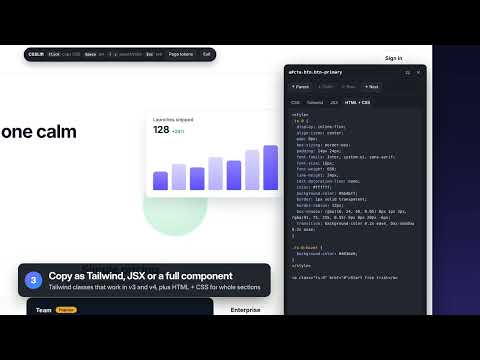
CSSLift is a CSS viewer for developers and designers. Hover any element on any website to see its styles, then click once to copy clean code you can paste straight into your project. WHAT YOU CAN DO • Inspect: hover to see font, colors, spacing, radius and text contrast in a live tooltip. • Copy CSS: get the rules the author actually wrote, with variables resolved, browser defaults removed and :hover, :focus and ::before states included. • Convert to Tailwind CSS: classes that work in Tailwind v3 and v4, ready for your markup. • Copy as JSX: a React-ready style object. • Copy whole components: rebuild a section as HTML + CSS with all its children, or open it in CodePen. • Check accessibility: WCAG 2.2 contrast ratio with AA and AAA grades, measured against the real background. • Export design tokens: pull a site's colors, fonts, type scale, spacing, radii and shadows as CSS variables, a Tailwind theme or W3C design-token JSON. HOW TO USE IT 1. Open any website and press Alt+Shift+C (or click the toolbar icon). 2. Hover an element. Use the arrow keys to move to its parent, child or sibling. 3. Click to copy. Switch tabs for Tailwind, JSX or HTML + CSS. 4. Press Alt+Shift+T to see and export the page's design tokens. WHY CSSLIFT • Output reads like hand-written code, not a dump of computed values. • Works on modern sites: cascade layers, native nesting, logical properties, strict Content-Security-Policy pages and right-to-left layouts. • Private by design: CSSLift only runs on the tab where you start it. No account, no tracking, no data leaves your browser. Good for front-end developers, UI designers, students learning CSS and anyone who wants to understand how a page is built. Available in English, Spanish, Portuguese, French, German, Japanese, Chinese and Korean. Questions or ideas? Use the support tab on this page.
0 out of 5No ratings
Details
- Version0.1.0
- UpdatedOctober 28, 2026
- FeaturesOffers in-app purchases
- Offered byDinesh Kumar
- Size61.22KiB
- Languages8 languages
- Developer
Email
dineesfdc@icloud.com - Non-traderThis developer has not identified itself as a trader. For consumers in the European Union, please note that consumer rights do not apply to contracts between you and this developer.
Privacy

This developer declares that your data is
- Not being sold to third parties, outside of the approved use cases
- Not being used or transferred for purposes that are unrelated to the item's core functionality
- Not being used or transferred to determine creditworthiness or for lending purposes