


Overview
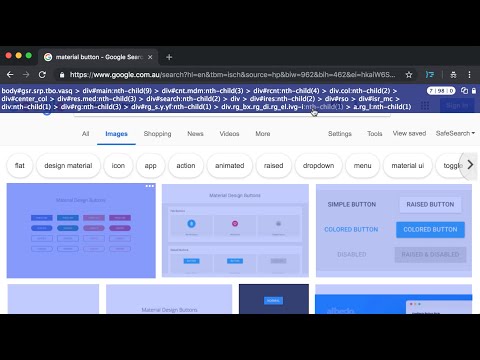
Generate a copiable CSS Selector with a mouseover without Devtool
Clean, simple and intuitive to use, accompanied with these exclusive features. ✓ Copiable and tweak-able Selector ready to use in CSS/JavaScript ✓ Highlights of elements which match the Selector ✓ Total matches based on the Selector within Viewport context ✓ The choice of Concise or Verbose selector ✓ Minimal interference with the page ≡ How to Use * Short version: - Enable the App, Use "CTRL" Key to lock/unlock the selector highlight in position and click the Copy button to copy the selector. - If needed, click on the selector path to tweak the selector before copying. - Use "ESC" key to exit the App * Detailed User Guide: https://github.com/CharltonC/chrome-css-selector-capture-doc/blob/master/README.md * Beware the extension does not support the following contexts: - shadow DOM (suggestion: use chrome devtool since you will be traversing down the shadow root anyway) - iframe (suggestion: to open the iframe URL in new tab and use the extension) ≡ Where would this extension be useful * The extension would typically suit the use of Front End Development, End to End testing such as Selenium as well as Data Scraping where visually identifying a target, matches and getting the CSS selector are needed. * If you do find this extension useful, please support it by simply giving it a good review and that will help others find it. ≡ Privacy * The extension does NOT collect any data or send data to third party. ≡ Release * 2.4.1 (2024.07.29) - Adjusted text alignment * 2.4.0 (2024.06.06) - Optimization for highlights, scroll and resize * 2.3.2 (2023.08.24) - Upgraded to manifest v3 * 2.3.1 (2021.09.01) - Fixed algorithm in v2.3.0 * 2.3.0 (2021.07.15) - Optimization for concise selector * 2.2.0 (2019.03.23) - Added a User Guide Link in Extension Icon Popup * 2.1.0 (2019.03.21) - Added a shortcut hotkey (CTRL) for locking toggle of the overlays * 2.0.0 (2019.02.25) - Optimization for concise selector (i.e. shorter) - Adjustment of selector background opacity when trigger button for Settings Dialog is on top and user hovers it * 1.0.3 (2018.10.15) - Optimization for selector retrieval * 1.0.0 (2018.09.29) - Initial Release
5 out of 513 ratings
Details
- Version2.4.1
- UpdatedMarch 10, 2026
- Offered byPOINT & SHOOT
- Size116KiB
- LanguagesEnglish
- Developer
Email
charltoncnpm@gmail.com - Non-traderThis developer has not identified itself as a trader. For consumers in the European Union, please note that consumer rights do not apply to contracts between you and this developer.
Privacy

This developer declares that your data is
- Not being sold to third parties, outside of the approved use cases
- Not being used or transferred for purposes that are unrelated to the item's core functionality
- Not being used or transferred to determine creditworthiness or for lending purposes
Support
For help with questions, suggestions, or problems, please open this page on your desktop browser