


개요
Instantly inspect elements and explore CSS properties, XPath, and more. Easily export assets, color palettes, and typography.
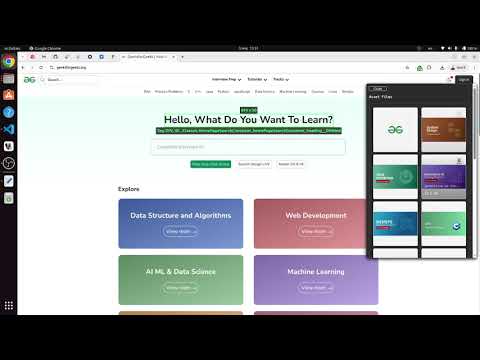
CSS Peek: Element Inspector helps you instantly inspect any element on a webpage, explore its CSS box model, styles, colors, and typography, and export assets, color palettes, and typography styles in just a few clicks. ✨ Features: - Click any element to view its full CSS styles. - Visual box model diagram with color-coded layers and pixel values inside each layer. - Inspect and copy the color palette of the page. - Inspect and copy typography and fonts used on the page. - View and download assets from the webpage. - Manipulate the selected element’s styles in the Manipulate tab, with the ability to persist CSS changes across multiple websites. Each website has its own dedicated storage for saved styles. - A live color picker that allows selecting a color from anywhere on the page and updating the UI preview in real-time. - When an image element is selected, you can drag & drop a new image directly onto it. - The extension allows adjusting CSS of the selected element using keyboard shortcuts. This helps test spacing, sizing, colors, etc., without touching the code. - XPath Locator that finds both absolute and relative XPath selectors for an element, suggests improvements for more stable locators, and generates ready-to-use Playwright and Cypress code snippets. - Smart Mode Inspector enables fast element inspection while hovering, with an integrated accessibility checker. - Ability to toggle the main hover inspector on and off, allowing you to interact with the page (click buttons, navigate, etc.) and then re-enable it to continue inspecting elements. - Accessibility tab where you can find a complete report of the accessibility status of the current page with suggestions how to fix the issues where needed. - Light/Dark mode switcher. Lightweight and user friendly.
5점 만점에 5점평점 10개
세부정보
- 버전1.1.4
- 업데이트됨2026년 2월 22일
- 제공daniel.ivanov.delchev
- 크기877KiB
- 언어English
- 개발자
이메일
daniel.ivanov.delchev@gmail.com - 비판매자판매자로 식별되지 않은 개발자입니다. 유럽 연합에 거주하는 소비자의 경우, 이 개발자와 체결한 계약에 대해서는 소비자 권리가 적용되지 않을 수 있음을 유의해야 합니다.
개인정보 보호

개발자가 사용자 데이터에 관해 다음과 같이 선언했습니다
- 승인된 사용 사례를 제외하고 서드 파티에 판매하지 않음
- 항목의 핵심 기능과 관련 없는 목적으로 사용하거나 전송하지 않음
- 신용도 판단 또는 대출 목적으로 사용하거나 전송하지 않음