

CSS Inspector

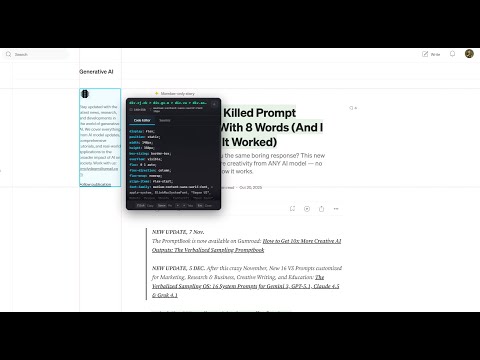
Overview
Inspect and copy CSS from any element on any webpage
# CSS Inspector - Chrome Extension Quickly inspect and copy CSS from any element on any webpage. ## Features - **Point-and-click inspection**: Hover to highlight elements, click to select and display CSS. - **Advanced CSS extraction**: Get computed styles and source rules from stylesheets. - **Premium Glassmorphism UI**: Interactive, cursor-following overlay panel with a sleek, modern design. - **Interactive Panel**: Pin/unpin the panel, switch between 'Code Editor' and 'Sources' views, and navigate tabs with arrow keys. - **One-click copy**: Copy CSS rules, selectors, or source styles with a single click. - **Keyboard shortcuts**: `Escape` to close, `Space` to pin/unpin the panel, `Arrow keys` to switch tabs. - **Ruler guides**: Visual crosshair rulers for accurate element measurement. - **Instant Feedback**: Toast notifications for copy actions and other interactions. - **Accessibility**: Supports `focus-visible` and `prefers-reduced-motion` for enhanced usability. - **Dark Theme**: VS Code-inspired dark theme for a consistent developer experience.
0 out of 5No ratings
Details
- Version1.0.0
- UpdatedDecember 16, 2025
- Offered bynathandev
- Size4.27MiB
- LanguagesEnglish
- DeveloperDANG TRAN NAM
Email
dangtrannam2001@gmail.comPhone
+84 522 991 706 - TraderThis developer has identified itself as a trader per the definition from the European Union and committed to only offer products or services that comply with EU laws.
Privacy

CSS Inspector has disclosed the following information regarding the collection and usage of your data. More detailed information can be found in the developer's privacy policy.
CSS Inspector handles the following:
This developer declares that your data is
- Not being sold to third parties, outside of the approved use cases
- Not being used or transferred for purposes that are unrelated to the item's core functionality
- Not being used or transferred to determine creditworthiness or for lending purposes