

CS2 Crosshair Extractor
8 ratings
)
Overview
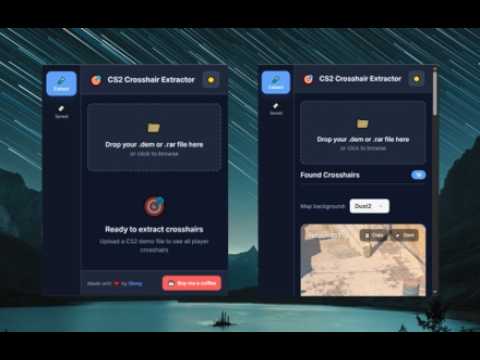
Extract, preview, save, and copy CS2 crosshair codes from demos, or manually save codes with a modern interface.
CS2 Crosshair Extractor Easily extract, preview, save, and share player crosshairs from your CS2 demo files, or save crosshair codes manually from anywhere. ⭐️ What does this extension do? CS2 Crosshair Extractor lets you upload your CS2 demo (.dem) or .rar files and instantly see the unique crosshair settings used by players in the match. You can preview, copy, and save your favorite crosshairs for later. You can also manually add any CS2 crosshair code from another source, making it easy to build your own collection of crosshairs. ⭐️ Features Instant Crosshair Extraction: Drop a CS2 demo or archive and get the crosshairs used by players in the game. Visual Previews: See exactly how each crosshair looks, rendered on real CS2 map backgrounds. Save Crosshairs: Save extracted crosshairs to your personal collection so you can easily find them again. Manually Add Crosshairs: Have a crosshair code from a website, friend, pro player, or another source? Paste it directly into the extension and save it. Easy Copying: Copy any crosshair code to your clipboard with a single click. .dem & .rar Support: Works with individual demo files and compressed archives containing multiple demos. Light & Dark Themes: Use a clean, modern interface in the theme you prefer. Privacy Focused: All demo processing and crosshair extraction happens locally in your browser. ⭐️ Perfect for Players looking to try professional or unique CS2 crosshairs Players who want to collect and organize their favorite crosshairs Anyone who wants to extract crosshairs from CS2 demos Players who find crosshair codes online and want to save them for later Anyone who wants to quickly preview, copy, and share CS2 crosshairs ⭐️ How to use Extract crosshairs from a demo: Open the extension popup. Drag and drop your .dem or .rar file, or click to browse. If it's a .dem file, it will be processed automatically. If it's a .rar file, select the map you want to extract crosshairs from. Browse the extracted crosshairs, preview them, and copy or save the ones you like. Save a crosshair manually: Open the Saved section. Enter an optional name for your crosshair. Paste a CS2 crosshair code from another source. Click Save Crosshair. Your crosshair will be added to your saved collection. ⭐️ Privacy Policy CS2 Crosshair Extractor does not collect, store, or transmit personal data or user information. All file processing and crosshair extraction is performed locally in your browser. No files, crosshair codes, or other data are sent to any server or third party. The extension does not use analytics, tracking, or advertising technologies. No user data is shared, sold, or used for purposes beyond the extension's core functionality. If you have any questions or concerns about privacy, please contact me! ⭐️ Additional If you wish to contact me, please use the email provided on the Chrome Web Store page or any of the social links available in the extension. You can access these links from the extension after pinning it to your browser. ⭐️ Take your aim to the next level — extract, preview, save, and discover CS2 crosshairs with ease! ⭐️
4 out of 58 ratings
Details
- Version4.1
- UpdatedOctober 1, 2026
- Offered byShrey
- Size22.08MiB
- LanguagesEnglish
- Developer
Email
shrianshpandey9@gmail.com - Non-traderThis developer has not identified itself as a trader. For consumers in the European Union, please note that consumer rights do not apply to contracts between you and this developer.
Privacy

This developer declares that your data is
- Not being sold to third parties, outside of the approved use cases
- Not being used or transferred for purposes that are unrelated to the item's core functionality
- Not being used or transferred to determine creditworthiness or for lending purposes
Support
For help with questions, suggestions, or problems, please open this page on your desktop browser