


Overview
Harness your browsing into a personal wiki. One-click AI summaries with PDFs, screenshots, and markdown notes.
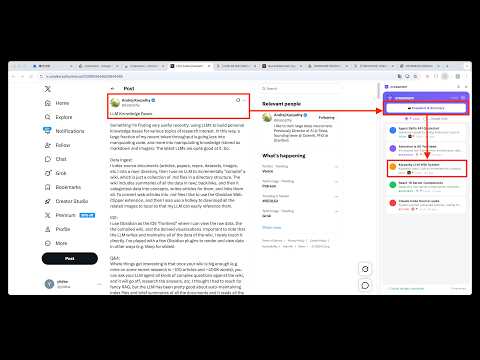
crossmem turns any web page into a structured memory — automatically. Click Snapshot on an arxiv paper, a Wikipedia article, or a blog post. crossmem reads the page, generates an AI summary, and files it as a memory ball in your side panel. The raw source (PDF or screenshot) and a wiki-style markdown note are saved to your local filesystem or Google Drive. HOW IT WORKS 1. Open any web page 2. Click Snapshot in the side panel (or right-click → Remember This Page) 3. AI summarizes the page and categorizes it (research, tech, resource, idea, action) 4. A memory ball appears with title, summary, source link, and category 5. Raw file (PDF/screenshot) + wiki markdown saved automatically WHAT YOU GET - Memory balls: color-coded by category, searchable, expandable - Raw snapshots: arxiv PDFs downloaded, other pages screenshotted - Wiki notes: structured markdown with frontmatter, ready for Obsidian or any editor - Side panel UI: always accessible, never leaves your browser - Right-click menu: "Remember This Page" or "Remember Selection" - Bridge API: local WebSocket API for scripts and AI agents to drive crossmem programmatically STORAGE OPTIONS - Local: files saved to ~/crossmem/ (configurable) via the companion bridge - Google Drive: summary files in your personal crossmem/ folder - Both: use local for raw files, Drive for cloud backup YOUR DATA, YOUR CONTROL - No backend servers, no analytics, no telemetry - AI calls go directly from your browser to your own API key - Everything stored locally or in your own Google Drive - Open source: inspect every line of code Built for researchers, developers, and anyone who reads more than they can remember. --- crossmem 把任何網頁自動變成結構化的記憶。 在 arxiv 論文、維基百科或任何 blog 上按一下 Snapshot,crossmem 讀取頁面、用 AI 產生摘要、在側邊欄生成一顆 memory ball。原始檔案(PDF 或截圖)和 wiki 風格的 markdown 筆記會自動存到你的本機或 Google Drive。 運作方式 1. 打開任何網頁 2. 在側邊欄按 Snapshot(或右鍵選 Remember This Page) 3. AI 摘要頁面並自動分類(research、tech、resource、idea、action) 4. 記憶球出現,帶有標題、摘要、來源連結、分類 5. 原始檔(PDF/截圖)+ wiki markdown 自動存檔 你會得到什麼 - 記憶球:依分類上色、可搜尋、可展開 - 原始快照:arxiv 論文下載 PDF、其他網頁截圖 - Wiki 筆記:帶 frontmatter 的結構化 markdown,可直接餵 Obsidian 或任何編輯器 - 側邊欄 UI:隨時可用,永遠不離開你現在的頁面 - 右鍵選單:Remember This Page 或 Remember Selection - Bridge API:本地 WebSocket,讓任何 script 或 AI agent 程式化操作 crossmem 儲存選項 - 本機:透過 bridge 存到 ~/crossmem/(可設定路徑) - Google Drive:摘要檔存在你自己的 crossmem/ 資料夾 - 混合:原始檔走本機、摘要走 Drive 作為雲端備份 你的資料、你的掌控 - 沒有後端伺服器、沒有數據分析、沒有 telemetry - AI 呼叫直接從瀏覽器走你自己的 API key - 所有資料都在本機或你自己的 Google Drive - 開源:每一行程式碼都可以檢視 為研究者、開發者、以及所有讀得比記得多的人打造。
0 out of 5No ratings
Details
- Version1.1.0
- UpdatedApril 14, 2026
- Size82.84KiB
- LanguagesEnglish (United States)
- DeveloperWebsite
Email
yiidtw@gmail.com - Non-traderThis developer has not identified itself as a trader. For consumers in the European Union, please note that consumer rights do not apply to contracts between you and this developer.
Privacy

This developer declares that your data is
- Not being sold to third parties, outside of the approved use cases
- Not being used or transferred for purposes that are unrelated to the item's core functionality
- Not being used or transferred to determine creditworthiness or for lending purposes