

Crop It!
13 個評分
)
總覽
Crop It! Provide users crop current web page's screenshot feature. Users could use it to capture images they need.
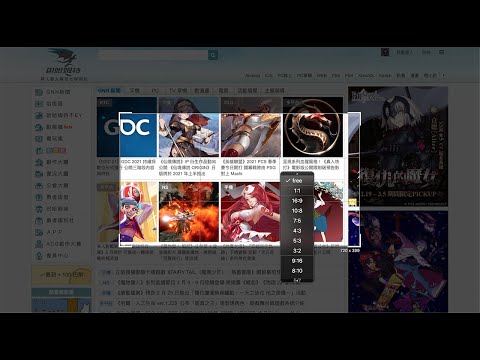
Use 「Crop It!」 to crop the exactly screenshot you need. Users could choose to save the screenshot into a file or clipboard. - Here comes several ways to turn on 「Crop It!」. 1. Turn on contextMenu & choose 「Crop It!」. 2. Use keyboard shortcut > 「Cmd (Ctrl) + . 」. - Usage instructions: 1. Turn on 「Crop It!」. 2. Adjust the selection size & position you need. (Users could press keyboard 「Esc」or click overlay to turn off 「Crop It!」) 3. Right-click on selection, there will be many aspect-ratio to choose. 4. Double click the selection or press keyboard 「Enter」 to save screenshot into a image file. Or press 「Cmd (Ctrl) + c」to save screenshot into clipboard. Otherwise, users could always use options to set overlay's color or opacity they like. - Change Log: 1.0.8 a. Fix shortcut > f issue. 1.0.7 a. Fix shortcut issue. 1.0.6 a. Migrate to MV3. b. Performance enhancement. 1.0.5 a. Add keyboard shortcut >「 Shift 」when resize selection for fix its aspect-ratio. b. Unify system UI & dark mode support. c. Unfreeze scroll-lock when 「Crop It!」turn on. d. Minor bug fixed & performance enhance. 1.0.4 a. Add aspect-ratio picker for different usages. b. Add keyboard shortcut >「 f 」for quick expand / shrink selection to fullscreen. 1.0.3 a. Add keyboard shortcut guide (「 Shift 」 + 「 ? 」) & performance enhance. 1.0.2 a. Add keyboard shortcut > 「 ↑ 」、「 ↓ 」、「 ← 」、「 → 」to move selection strictly.
2.5 分 (滿分 5 分)13 個評分
詳細資料
- 版本1.0.8
- 已更新2021年12月7日
- 提供者Paul Li
- 大小45.18KiB
- 語言中文(台灣)
- 開發人員mei's studio
14f. no. 66 San Chung Rd, Nangang dist. Tapipei, Taipei City 115 Taiwan電子郵件
meistudioli@gmail.com - 非交易商這位開發人員並未表明自己是交易商。歐盟地區的消費者請注意,消費者權利不適用於你和這位開發人員之間簽訂的合約。
隱私權

這位開發者就你的資料做出下列聲明:
- 除經核准的用途外,不會將你的資料販售給第三方
- 不會基於與商品核心功能無關的目的,使用或轉移資料
- 不會為了確認信用度或基於貸款目的,使用或轉移資料
支援
如有疑問或建議,請使用電腦版瀏覽器開啟這個頁面