

Crop It!
13 puan
)
Genel bakış
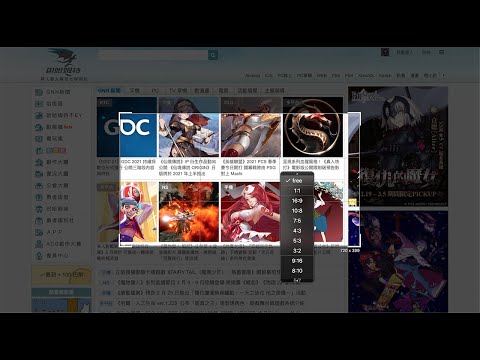
Crop It! Provide users crop current web page's screenshot feature. Users could use it to capture images they need.
Use 「Crop It!」 to crop the exactly screenshot you need. Users could choose to save the screenshot into a file or clipboard. - Here comes several ways to turn on 「Crop It!」. 1. Turn on contextMenu & choose 「Crop It!」. 2. Use keyboard shortcut > 「Cmd (Ctrl) + . 」. - Usage instructions: 1. Turn on 「Crop It!」. 2. Adjust the selection size & position you need. (Users could press keyboard 「Esc」or click overlay to turn off 「Crop It!」) 3. Right-click on selection, there will be many aspect-ratio to choose. 4. Double click the selection or press keyboard 「Enter」 to save screenshot into a image file. Or press 「Cmd (Ctrl) + c」to save screenshot into clipboard. Otherwise, users could always use options to set overlay's color or opacity they like. - Change Log: 1.0.8 a. Fix shortcut > f issue. 1.0.7 a. Fix shortcut issue. 1.0.6 a. Migrate to MV3. b. Performance enhancement. 1.0.5 a. Add keyboard shortcut >「 Shift 」when resize selection for fix its aspect-ratio. b. Unify system UI & dark mode support. c. Unfreeze scroll-lock when 「Crop It!」turn on. d. Minor bug fixed & performance enhance. 1.0.4 a. Add aspect-ratio picker for different usages. b. Add keyboard shortcut >「 f 」for quick expand / shrink selection to fullscreen. 1.0.3 a. Add keyboard shortcut guide (「 Shift 」 + 「 ? 」) & performance enhance. 1.0.2 a. Add keyboard shortcut > 「 ↑ 」、「 ↓ 」、「 ← 」、「 → 」to move selection strictly.
5 üzerinden 2,813 puan
Ayrıntılar
- Sürüm1.0.8
- Güncellenme tarihi:7 Aralık 2021
- Sunan:Paul Li
- Boyut45.18KiB
- Diller中文(台灣)
- Geliştiricimei's studio
14f. no. 66 San Chung Rd, Nangang dist. Tapipei, Taipei City 115 TaiwanE-posta
meistudioli@gmail.com - Tacir olmayanBu yayıncı kendisini tacir olarak tanımlamamış. Avrupa Birliği'ndeki tüketiciler açısından bakıldığında, bu geliştiriciyle yapmış olduğunuz sözleşmelerde tüketici haklarının geçerli olmadığını lütfen unutmayın.
Gizlilik

Bu geliştirici, verilerinizle ilgili olarak aşağıdakileri beyan eder:
- Onaylanan kullanım alanları dışında üçüncü taraflara satılmaz
- Öğenin temel işleviyle alakasız amaçlar için kullanılmaz ya da aktarılmaz
- Kredibilitenin belirlenmesi veya borç verme amaçlarıyla kullanılmaz ya da aktarılmaz
Destek
Sorular, öneriler veya sorunlarla ilgili yardım için lütfen bu sayfayı masaüstü tarayıcınızda açın