

CRMdock - CRM for WhatsApp Web

Overview
CRM for WhatsApp Web: a sales board with follow-up reminders and scheduled messages. Customer data stays on your computer.
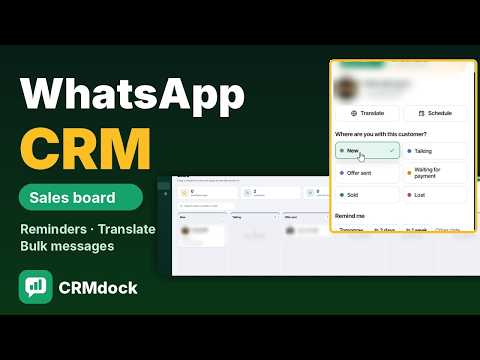
CRMdock is a simple CRM for WhatsApp Web that shows who to answer next, keeps your customers on a sales board and reminds you to follow up. If you sell through chat, people get lost between new chats. Someone asks a question, you promise to write back, and a week later the chat is buried. CRMdock sits next to your inbox and turns them into a clear list of customers, steps and reminders. There is no account to create and nothing to set up: it is a CRM you can understand in a minute. HOW IT WORKS 1. Open WhatsApp Web. A slim bar appears on the right side of the screen. 2. Open a chat and choose the step that fits, for example New or Sold. That person is now on your board. 3. Add a note, an amount or a reminder while you talk. 4. Press "Next customer" and go through everyone who is waiting for an answer, one by one. SALES BOARD AND CUSTOMER LIST • Drag customers from one step to the next as the sale moves on. Steps and colours can be renamed and reordered. • See the open amount in every step and what you sold this week and this month. • Search by name, number or note, filter by tag, and select several people at once. • Save the list as a spreadsheet, or keep a full backup file of your work. • Already using labels in your business account? Bring those people in with one click. NEVER FORGET A FOLLOW-UP • "Waiting for your reply" lists the chats where the last word was theirs, with a coloured badge that shows how long they have been waiting. • Set a reminder for tomorrow, in three days, next week or any date. A notification appears with the person's name and photo. • A reminder is marked done when you answer after its time. SCHEDULE A MESSAGE • Write now and send later. Pick one hour from now, tomorrow morning, Monday morning or your own date and time. • It goes out at that time while Chrome is open. If Chrome was closed and the moment has passed, nothing is sent and you are told, so old news never arrives by surprise. • Everything that is still waiting sits in one place, and each item can be cancelled. SEND A BULK MESSAGE • Choose a step, a tag or your own selection, write the text once with the first name filled in, and check it before it goes. • They go one at a time with pauses in between, up to 50 people in one round and 200 a day. Stop and continue whenever you like. • Send only to people who know you. Writing to strangers can get a number restricted. QUICK REPLIES • Save the answers you type again and again, with the customer's name filled in automatically. • Add a photo, a file or a voice message you recorded once. • Click a reply and it appears in the box where you type. You press send. TRANSLATE CHATS • Read what they write in your own language, in a side panel or right under each bubble. • Write your answer in your own language, see how it will look in theirs, and put it in the box. • Translation uses the translator built into Chrome. A language pack is downloaded once the first time. HIDE WHAT OTHERS SHOULD NOT SEE • One button blurs names and text when someone is sitting next to you. Move the mouse over a line to read it. YOU STAY IN CONTROL • Replies and translations are only written into the box. Nothing goes out until you press send. • Scheduled and bulk sending happen only after you confirm. • Remove a customer from the board at any time; the conversation itself is not touched. GOOD TO KNOW • You need Chrome on a computer and a signed-in web session of WhatsApp. • The CRM keeps its data in this browser. Save a backup file before you remove the extension or change computers. • The web app changes from time to time. If something stops working after such a change, an update follows. PRIVACY • No account, no sign-in and no password. • Your customer list, notes, reminders and replies stay on your computer. The extension does not upload your conversations or contacts to its developer or anyone else. • The only time text leaves your computer is when you choose "Open in Google Translate" because Chrome cannot translate a language: that text is then opened on Google's page, and the button says so. CRMdock is an independent extension. It is not affiliated with, endorsed by, sponsored by or in any way officially connected to WhatsApp LLC or Meta Platforms, Inc., or any of their subsidiaries or affiliates. "WhatsApp" and related names, marks and logos are trademarks of their respective owners and appear here only to describe what this extension works with.
0 out of 5No ratings
Details
- Version1.0.0
- UpdatedNovember 28, 2026
- Size578KiB
- Languages52 languages
- DeveloperWebsite
Email
yasininprofili@gmail.com - Non-traderThis developer has not identified itself as a trader. For consumers in the European Union, please note that consumer rights do not apply to contracts between you and this developer.
Privacy

CRMdock - CRM for WhatsApp Web has disclosed the following information regarding the collection and usage of your data. More detailed information can be found in the developer's privacy policy.
CRMdock - CRM for WhatsApp Web handles the following:
This developer declares that your data is
- Not being sold to third parties, outside of the approved use cases
- Not being used or transferred for purposes that are unrelated to the item's core functionality
- Not being used or transferred to determine creditworthiness or for lending purposes
Support
For help with questions, suggestions, or problems, visit the developer's support site