

CRM Window

Overview
Opens your CRM in a persistent popup window while browsing. Hover over the extension icon to see instructions.
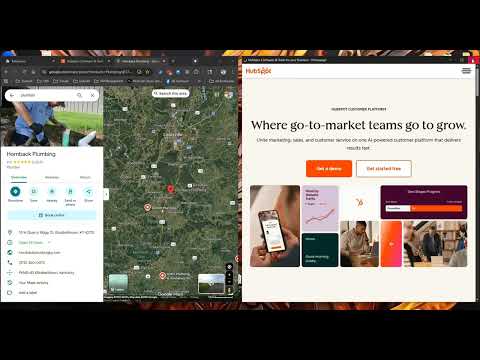
Transform your workflow with CRM Window - the ultimate productivity tool that creates a seamless split-screen setup for sales professionals and CRM users. 🚀 KEY FEATURES: • Intelligent Split-Screen - Automatically arranges browser (50%) and CRM (50%) side-by-side • Auto-Restore Functionality - Browser automatically returns to full screen when CRM window closes • Persistent CRM Access - CRM window stays open until you manually close it • Universal CRM Support - Works with HubSpot, Salesforce, Pipedrive, Zoho CRM, Monday.com, and any web-based CRM • Smart Window Management - Automatically detects screen size and optimizes window dimensions • Seamless Copy/Paste Workflow - Perfect setup for copying information from web pages directly into your CRM • One-Click Setup - Single click arranges both windows, single close restores everything • Easy Setup - Right-click on your CRM website to set it as your default CRM URL 💼 PERFECT FOR: • Sales professionals who research prospects online • Business development teams • Customer service representatives • Account managers • Anyone who needs to copy data between web pages and CRM systems ⚡ HOW IT WORKS: 1. Click the extension icon to activate split-screen mode 2. Browser window automatically resizes to 50% on the left 3. CRM window opens at 50% on the right 4. Both windows stay positioned for easy copy/paste workflows 5. Close the CRM window → Browser automatically returns to full screen 6. Clean, seamless experience with zero manual window management 🎯 GET STARTED: • Install the extension and click the icon • Right-click anywhere on your CRM website and select "Set CRM URL for this site" • Or manually enter your CRM URL in the settings • Start your split-screen workflow immediately! 🔒 PRIVACY & SECURITY: • 100% local operation - no data sent to external servers • Only stores your CRM URL preference locally • No tracking of browsing activity or CRM data • Works entirely offline after initial setup 💡 SMART WORKFLOW: • Perfect for LinkedIn prospecting → Copy contact details to CRM • Research companies → Paste company info directly into CRM • Update customer records → Copy notes from web pages to CRM • Zero window switching required - everything stays in view Whether you're prospecting on LinkedIn, researching companies, or updating customer records, CRM Window creates the perfect dual-window environment that automatically manages itself. Never lose your place or waste time switching between windows again! Works with: HubSpot, Salesforce, Pipedrive, Zoho CRM, Monday.com, and any web-based CRM system.
0 out of 5No ratings
Details
- Version1.0.2
- UpdatedOctober 19, 2025
- Offered byEnKorp LLC
- Size21.17KiB
- LanguagesEnglish (United States)
- DeveloperEnKorp LLC
5903 S 71st W Ave Tulsa, OK 74107-8654 USEmail
team@enkorpllc.com - Non-traderThis developer has not identified itself as a trader. For consumers in the European Union, please note that consumer rights do not apply to contracts between you and this developer.
Privacy

CRM Window has disclosed the following information regarding the collection and usage of your data. More detailed information can be found in the developer's privacy policy.
CRM Window handles the following:
This developer declares that your data is
- Not being sold to third parties, outside of the approved use cases
- Not being used or transferred for purposes that are unrelated to the item's core functionality
- Not being used or transferred to determine creditworthiness or for lending purposes
Support
For help with questions, suggestions, or problems, please open this page on your desktop browser