

CRM for WhatsApp, LinkedIn, Slack, Telegram & Discord : Cogni

概要
Get instant reply suggestions, smart memory for chats details, and a unified conversation hub that keeps your chats organized.
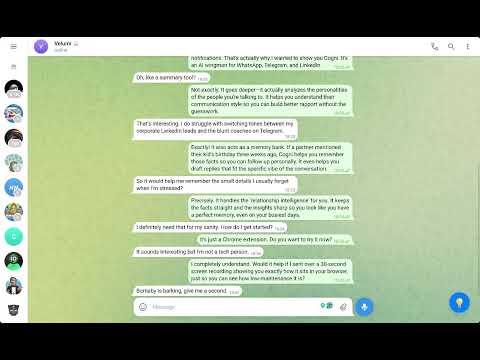
🚀 Cogni: AI Messaging Assistant & CRM for Whatsapp, LinkedIn, Slack, Telegram and Discord. Cogni is a powerful AI assistant that integrates seamlessly into your favorite messaging platforms. Get instant reply suggestions, deep conversation analysis, intelligent client memory, and a unified Conversation Hub that brings all your chats together across WhatsApp, Slack, LinkedIn, Discord, and Telegram - all without leaving your chat window. Stop "Chat Amnesia." Cogni is the ultimate cognitive offload assistant for high-stakes professionals. It provides a seamless Client Context Layer directly inside your browser, so you never lose track of a detail—whether it was discussed in a Slack thread, a Discord server, or a WhatsApp DM. 🚀 One AI Assistant. All Your Conversations. Cogni acts as a professional Message Drafter and Personal CRM across your most vital channels: WhatsApp CRM: Store client notes and budgets directly in the chat window. Slack AI Assistant: Draft Smart Replies for internal team updates or client Slack Connect channels. LinkedIn AI Assistant: Recall past conversations instantly to build better rapport. Discord CRM: Manage community interactions and high-volume DMs with ease. Telegram Helper: Organize technical updates and rapid-fire messaging. ✨ KEY FEATURES 🌐 Conversation Hub - Your Unified Command Center See ALL your conversations in one place - across every platform. Cogni automatically saves and syncs your chats from WhatsApp, Slack, LinkedIn, Discord, and Telegram into a single, searchable hub. No more switching tabs to remember what was discussed where. • Show All: Browse every conversation at a glance with platform icons, timestamps, and message previews • Explore All: Ask AI questions across ALL your conversations simultaneously - "What did anyone mention about the Q4 budget?" or "Who was waiting for a callback?" • Auto-Sync: Conversations update automatically as you chat - no manual saving needed • Quick Access: Jump directly to any conversation with one click 💬 Smart Reply Suggestions Stuck on what to say? Cogni analyzes the conversation context and generates multiple reply options in different tones - Professional, Friendly, Witty, and more. Click to copy or send directly. Customize your preferred reply styles to match your communication needs. 📊 Deep Conversation Analysis Understand the dynamics of any conversation with AI-powered analysis. Get insights into communication patterns, sentiment, and key discussion points - perfect for reviewing important negotiations or client interactions. 👤 Personality Profiling Build a better understanding of who you're talking to. Cogni creates personality profiles based on communication style, helping you adapt your approach for more effective conversations. ⚠️ Risk Assessment Evaluate potential clients or partners with intelligent risk analysis. Cogni identifies red flags, inconsistencies, manipulation tactics, and concerning patterns in the other party's messages - protecting you from problematic business relationships. 📂 Client Memory (Smart Briefing) Never forget important details again! Cogni extracts and stores key facts, preferences, and requirements from your conversations. Access this information instantly whenever you need it. 📝 Work Notes (Curiosities) Save important snippets and information from any conversation to your personal notes. Perfect for capturing ideas, action items, or reference material. 💡 Instant Intel Ask any question about the current conversation and get instant AI-powered answers. Use quick actions like Summarize, TLDR, Key Points, or Action Items to get the information you need fast. 🔍 Logic Verification Select any text and let Cogni analyze it for logical fallacies, unsupported claims, misleading statistics, and emotional manipulation. Great for fact-checking proposals, offers, or claims. 👶 Explain Like I'm 10 Complex message? Select it and get a simple, easy-to-understand explanation using analogies and friendly language. 🌐 SUPPORTED PLATFORMS • WhatsApp Web • Telegram Web (K and A versions) • LinkedIn Messaging • Slack • Discord 🔒 Enterprise-Grade Privacy (NDA-Safe) We built Cogni for the most regulated industries. Local-Only Storage: All data stays in your browser (chrome.storage.local). No Cloud Sync: Your messages never touch our servers. Zero-Data Collection: Perfect for Lawyers, Consultants, and Finance Pros who require absolute confidentiality. 🌍 MULTILINGUAL SUPPORT Cogni automatically responds in the language of your conversation. Whether you're chatting in English, Hebrew, Spanish, or any other language - Cogni adapts to match. ⚡ EASY TO USE 1. Install the extension 2. Open WhatsApp, Telegram, LinkedIn, Slack, or Discord 3. Click the Cogni widget (💡) 4. Choose your action - it's that simple! The Conversation Hub automatically saves your chats as you browse - no extra steps needed. 💼 PERFECT FOR • Sales professionals managing multiple client conversations across platforms • Customer support teams needing quick, quality responses • Business owners evaluating potential partners • Freelancers juggling client communications across different channels • Community managers handling Discord and Slack simultaneously • Anyone who wants to communicate more effectively without losing context 🔧 CUSTOMIZABLE • Set your preferred AI models • Customize reply styles and tones • Configure language preferences • Manage your saved client information • Organize your Conversation Hub Transform your messaging experience with Cogni - communicate smarter, not harder! Questions or feedback? We'd love to hear from you!
5 点満点で 54 件の評価
詳細
プライバシー

CRM for WhatsApp, LinkedIn, Slack, Telegram & Discord : Cogni から、お客様のデータの収集と使用に関する以下の情報が開示されています。 詳しくは、デベロッパーの privacy policy をご確認ください。
CRM for WhatsApp, LinkedIn, Slack, Telegram & Discord : Cogni は次を扱います。
このデベロッパーは、お客様のデータについて以下を宣言しています
- 承認されている以外の用途で第三者に販売しないこと
- アイテムの中心機能と関係のない目的で使用または転送しないこと
- 信用力を判断する目的または融資目的で使用または転送しないこと
サポート
質問や提案、問題がある場合は、デベロッパーのサポートサイトにアクセスしてください。