

Crispip (PiP Expert) - Multiple Videos In One Picture-in-Picture Window

Overview
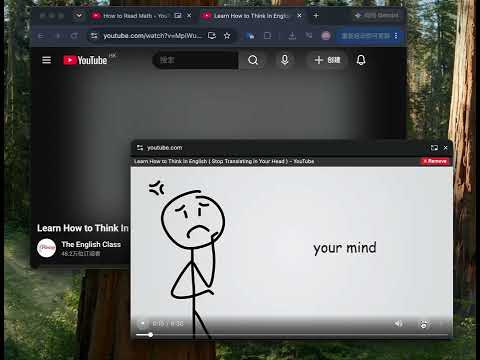
Multi-video PiP: one window, 4 layouts, per-video controls, screenshot, 5-hour recording, cinema mode, mute/pause others, history.
━━━━━━━━━━━━━━━━━━━━━━━━━━━━━━━━━━━ 📺 Crispip (PiP Expert) · Watch multiple videos, side by side ━━━━━━━━━━━━━━━━━━━━━━━━━━━━━━━━━━━ Your browser can float one video at a time. Crispip floats as many as you need — in one calm, always-on-top window. Pull a video out of its tab. Add a second. A third. They line up side by side, each with its own controls, while the pages underneath stay open and the videos keep playing. No tab hopping. No rewinding because you looked away. No choosing between the thing you're watching and the thing you're doing. ━━━━━━━━━━━━━━━━━━━━━━━━━━━━━━━━━━━ ✨ NEW IN 2.3 — CAPTURE, RECORD, CINEMA ━━━━━━━━━━━━━━━━━━━━━━━━━━━━━━━━━━━ 📸 Screenshot any frame One click saves the exact frame you're looking at as a full-resolution PNG. ⏺ Record what you're watching Up to 5 hours in one take, in Light, Balanced or Fidelity quality, with audio. The file goes straight into a folder you choose — no watermark, no account, no upload. A live REC timer in the card title bar shows exactly how long the take has been running. 🎬 Cinema mode Right-click any video and step into a dark, letterboxed theatre, complete with a row of seats along the bottom. Every other video pauses and mutes, so the film has your full attention. ⏱ Recording that knows when to stop It ends automatically at 5 hours, when the video ends, or when the player moves on to the next video — so one file never swallows the next episode. 🔗 Titles that follow the video When a site auto-plays the next episode, the card's title follows — even if the source tab is in the background. ━━━━━━━━━━━━━━━━━━━━━━━━━━━━━━━━━━━ 🎬 THE FOUR MOMENTS THAT STARTED IT ━━━━━━━━━━━━━━━━━━━━━━━━━━━━━━━━━━━ ▍1. A course video and a reference video You need both, but you only have one screen. Rewind to take notes, rewind to review, rewind to check a timestamp — every tab switch costs you your place. ▍2. A playlist you actually want to finish One tab per episode, constant switching. Episode 2 auto-plays while you're in another tab, and you miss it. ▍3. Learning a language with video and subtitles side by side Two tabs, one screen cut into pieces. You shrink both, or give up on one. ▍4. A drama in a floating window — but the browser allows only one Open a second video and the first one closes. You're forced to choose. Crispip is the answer to all four. ━━━━━━━━━━━━━━━━━━━━━━━━━━━━━━━━━━━ 🎯 WHAT YOU CAN DO ━━━━━━━━━━━━━━━━━━━━━━━━━━━━━━━━━━━ WATCH ✓ Many videos, one window Videos from different tabs share one independent floating window. Add another at any time; nothing is replaced. ✓ Four layouts Grid, Left L, Right L, or Both Sides with the main video in the middle. Right-click to switch. Your choice is remembered. ✓ Auto-follow the next episode When the site auto-plays the next video, the window follows — no reload, no reopening, no interruption. ✓ Cinema mode A dark stage, letterboxed picture, a row of seats. The other videos pause and mute until you come back. ✓ Fullscreen exclusive mode One video fills the window; the rest pause and resume exactly where they were. ✓ Works with your real work documents, spreadsheets and notes, your code editor — the floating window stays on top while you type, drag, resize or annotate. CONTROL ✓ Per-video controls: play/pause, volume, seek bar, speed (0.5×–2×) ✓ Keyboard: ←/→ for 5 seconds, ↑/↓ to switch videos in fullscreen ✓ Right-click any card: cinema mode / mute others / pause others / remove others / layout ✓ The source page video is muted and hidden while it floats, so you never get double audio CAPTURE ✓ Screenshot: the exact frame, native resolution, PNG ✓ Recorder: Light, Balanced or Fidelity; video + audio; WebM or MP4 ✓ Up to 5 hours per recording, auto-stopped at the limit, at the end of the video, or when the video changes ✓ A live REC timer in the card title bar shows the running time ✓ Files land in the folder you pick — no download-bar spam, no watermark ✓ A small toast confirms where the file went KEEP ✓ Cross-site history: title, link and length from every site, in one searchable list ✓ Filter by site, jump back in one click ✓ Stored only on your device for 6 months; switch recording off any time ✓ 51-language interface, including right-to-left Arabic ━━━━━━━━━━━━━━━━━━━━━━━━━━━━━━━━━━━ 🧠 WHY IT BEATS THE BUILT-IN FLOATING WINDOW ━━━━━━━━━━━━━━━━━━━━━━━━━━━━━━━━━━━ Chrome's built-in Picture-in-Picture: ✗ One video at a time ✗ Play/pause only ✗ A new video replaces the old one ✗ No capture, no recording, no theatre Crispip: ✓ As many videos as you need, in one window ✓ Four layouts, remembered ✓ Full controls on every video ✓ Adding a video stacks; it never replaces ✓ Mute, pause or remove the others in one click ✓ Screenshot, record and cinema mode ✓ Fullscreen exclusive + keyboard shortcuts ━━━━━━━━━━━━━━━━━━━━━━━━━━━━━━━━━━━ 💡 MORE REAL-WORLD SCENARIOS ━━━━━━━━━━━━━━━━━━━━━━━━━━━━━━━━━━━ 📚 Learning · Lecture + demo video side by side · Grammar explanation + listening practice · Coding tutorial + live output · Course video + your own notes in another window 🎬 Entertainment · Episode + reaction/commentary · Live match + commentary stream · A playlist that keeps playing while you work · Cinema mode when you want to sink into one film 💼 Work · a document or spreadsheet beside a tutorial · Code editor + documentation video · PowerPoint + a recorded demo · Screenshot a frame straight into a slide or a bug report 🎨 Creativity · Reference video + editing timeline · Design tutorial + Photoshop workflow · Dance choreography + practice · Record a take for review without a separate screen recorder ━━━━━━━━━━━━━━━━━━━━━━━━━━━━━━━━━━━ 🆓 FREE vs PAID — THE HONEST VERSION ━━━━━━━━━━━━━━━━━━━━━━━━━━━━━━━━━━━ FREE, FOREVER · One video at a time, in Chrome's own Picture-in-Picture · Auto-play the next episode · Cross-site video history · No account, no time limit, no credit card PAID LICENCE — MULTI-VIDEO MODE · Unlimited videos in one floating window · All four layouts · Screenshot and recorder (5 hours, three quality presets) · Cinema mode · Device management, so you can move the licence between computers · Email support · Monthly or yearly; cancel any time · 7-day money-back guarantee (see the refund policy for the one-device condition) Why paid? Multi-video streaming, encoding and capture all run on your machine, and the licence is what keeps the lights on. The free plan stays free — it is not a trial. No account is needed for either plan. Your licence key arrives by email after checkout; paste it into Settings and you're done. ━━━━━━━━━━━━━━━━━━━━━━━━━━━━━━━━━━━ 🔒 PRIVACY & SECURITY — STRAIGHT ANSWERS ━━━━━━━━━━━━━━━━━━━━━━━━━━━━━━━━━━━ WHAT LEAVES YOUR DEVICE · Nothing of your video. Frames travel from the source tab to the floating window over an encrypted peer-to-peer connection inside your browser (WebRTC). They never pass through our servers. · Nothing of your screenshots or recordings. They are written directly into the folder you choose on your computer. · Anonymous feature counts, on by default (Google Analytics 4). Examples: "screenshot taken", "recording started", "which quality preset", "success or failure". Never URLs, page titles, video titles, frames, filenames or personal data. You can turn this off in Settings at any time. WHAT STAYS ON YOUR DEVICE · Settings and your licence key · Cross-site video history (last 6 months; can be switched off) · Screenshots and recordings, in the folder you picked WHY IT ASKS FOR ACCESS TO ALL SITES Crispip cannot know in advance which site you'll want to float a video from. The content script looks for <video> elements, reads the page title and URL so the card can show what's playing, and mutes/hides the source video while it floats. It does not read page text, form fields, passwords, messages, or your browsing history, and it does not send page content anywhere. THE OTHER PERMISSIONS · storage — settings, licence, local history · alarms — periodic licence check and keep-alive · scripting / activeTab — inject the extractor when you click the icon · Host access — the same "all sites" reason above PAYMENTS Card details go to the payment provider (merchant of record). We never see or store them. The only email involved is the one you give at checkout, so your licence key can reach you. NO ADS. NO DATA BROKERS. NO SELLING ANYTHING. ━━━━━━━━━━━━━━━━━━━━━━━━━━━━━━━━━━━ ✅ COMPATIBILITY — WHAT WORKS, WHAT DOESN'T ━━━━━━━━━━━━━━━━━━━━━━━━━━━━━━━━━━━ WORKS · Sites that use a standard HTML5 <video> player — video sites, most course platforms, news sites and self-hosted players · Live streams, as long as the site exposes a standard video element · Multiple videos from different sites, at the same time DOESN'T WORK (AND WE WON'T PRETEND OTHERWISE) · DRM-protected streaming services. The browser deliberately protects those streams; Crispip does not bypass DRM. · Players that render into a canvas/WebGL surface instead of a <video> element. · Videos embedded inside another site's frame, when the browser blocks access. · A site that refuses to play while its tab is in the background — that's the site's choice, not something an extension can override. A NOTE ON YOUTUBE Crispip doesn't block ads. On YouTube it can click the Skip Ad button for you as soon as YouTube makes it available. That's it. ━━━━━━━━━━━━━━━━━━━━━━━━━━━━━━━━━━━ 🚀 GETTING STARTED ━━━━━━━━━━━━━━━━━━━━━━━━━━━━━━━━━━━ 1. Open any page with a video. 2. Click the Crispip icon in the toolbar. The video moves into a floating window, and the page keeps playing. 3. Switch to another tab with a video and click the icon again. The second video joins the same window. 4. Right-click a card to change the layout, mute the others, or enter cinema mode. 5. Click the camera icon for a screenshot, or the red dot to record. Pick a folder once; every capture goes there from then on. 6. Want to focus? Click fullscreen on one card. The rest pause and wait. That's the whole workflow. No account, no setup wizard, no new tab to manage. ━━━━━━━━━━━━━━━━━━━━━━━━━━━━━━━━━━━ ❓ QUESTIONS PEOPLE ACTUALLY ASK ━━━━━━━━━━━━━━━━━━━━━━━━━━━━━━━━━━━ Q: Is the free plan a trial? A: No. One video at a time, auto-play next and cross-site history are free forever. The paid licence adds multi-video mode, layouts, capture and cinema mode. Q: Do I need an account? A: No. Neither plan needs a sign-up. Your licence key arrives by email after purchase. Q: Does it work on YouTube? A: Yes. It uses the video YouTube is already playing, in Chrome's own Picture-in-Picture window. It doesn't alter the player's controls or block ads; it can click Skip Ad when YouTube offers it. Q: Can I record DRM-protected streams? A: No. Those streams are DRM-protected and the browser blocks capture. We don't work around DRM. Q: Where do my screenshots and recordings go? A: Into a folder you choose the first time. Neither is uploaded, and there's no watermark. Q: How long can a recording be? A: Up to 5 hours. It also stops automatically when the video ends or the player switches to a new video, so each file stays with its own video. Q: Does recording include audio? A: Yes — the audio from the video you're recording. Q: What happens when a site auto-plays the next episode? A: The floating window follows it. The title updates too, even if the source tab is in the background. The recording stops at the switch, so the next episode starts in a clean file. Q: Can I use my licence on another computer? A: Yes. Open Manage devices, verify your email, and remove a device you no longer use. The device limit depends on your plan. Q: What if I cancel or ask for a refund? A: The licence is revoked and the extension returns to the free plan automatically. Refunds are covered by a 7-day money-back guarantee; see the refund policy for details. Q: Is it allowed on the sites I use? A: Crispip doesn't download or re-stream the video. It displays the video the site is already playing in Chrome's Picture-in-Picture window — the same mechanism as the site's own PiP button, just with more than one video at a time. ━━━━━━━━━━━━━━━━━━━━━━━━━━━━━━━━━━━ 🗓 RELEASE NOTES ━━━━━━━━━━━━━━━━━━━━━━━━━━━━━━━━━━━ 2.3 — October 2026 NEW · Screenshot button on every player: native-resolution PNG, saved to your folder. · One-click recorder with Light / Balanced / Fidelity presets, audio included, WebM or MP4, up to 5 hours per take. · A live REC timer shows how long the current take has been running. · Cinema mode: a dark letterboxed stage, a row of seats, and every other video paused and muted. · Recordings stop automatically at 5 hours, when the video ends, or when the player switches to a new video. · Privacy Policy link in Settings. IMPROVED · The recording menu remembers your last preset and shows a clear stop control while recording. · Starting or stopping a recording also starts or pauses playback, so the file begins and ends where you expect. · The card title now follows auto-played videos, including when the source tab is in the background. · Toasts no longer cover the video; authorization prompts open inside the floating window. · 51-language interface, with RTL support. 2.2 — October 2026 · New name: Crispip (PiP Expert). Same extension, a clearer identity. · Licence keys now carry a plan prefix, which makes device management and support faster. · Clearer install-package description. ━━━━━━━━━━━━━━━━━━━━━━━━━━━━━━━━━━━ Multiple videos. One window. Zero distraction. That's Crispip. ━━━━━━━━━━━━━━━━━━━━━━━━━━━━━━━━━━━
3 out of 52 ratings
Details
- Version2.3.1
- UpdatedOctober 22, 2026
- FeaturesOffers in-app purchases
- Size283KiB
- Languages51 languages
- DeveloperWebsite
Email
superbabygg@gmail.com - Non-traderThis developer has not identified itself as a trader. For consumers in the European Union, please note that consumer rights do not apply to contracts between you and this developer.
Privacy

This developer declares that your data is
- Not being sold to third parties, outside of the approved use cases
- Not being used or transferred for purposes that are unrelated to the item's core functionality
- Not being used or transferred to determine creditworthiness or for lending purposes
Support
For help with questions, suggestions, or problems, please open this page on your desktop browser