

Tangy

Overview
A calm browser assistant: summarise pages, ask about what you are reading, remember your preferences, manage tabs and set reminders.
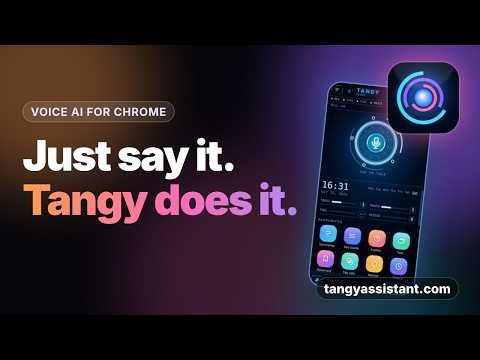
Tangy is a calm, voice-first assistant that lives in Chrome's side panel. Tap the glowing ring at the top and just say what you need. Tangy listens, does it, and answers out loud. Prefer typing? The chat sits right below the ring. WHAT TANGY CAN DO Talk to it Tap the ring, speak, and Tangy sends your request when you stop and reads the answer back. Tap again to stop it, or press Esc. Understand what you are reading Summarise a page, pull out the key points, or explain a highlighted passage. Right-click any selection to ask, explain, summarise, rewrite or translate it with Tangy. Work the browser for you Say "open YouTube", "search for pasta recipes", "reload", "go back" or "scroll down". These run instantly. Tangy can also list and switch tabs, group them, and close duplicate tabs. Find what you saw before Search your bookmarks and history, and bookmark the current page. Reminders "Remind me in 10 minutes to call mom." Tangy sets it and shows a notification when it is time. Remember your preferences Tell Tangy something once, such as your name or a recurring task, and it remembers. You can see, edit and delete every saved fact. Read your files and pictures Attach a text file, a picture or (with Anthropic) a PDF and ask about it. One-tap favourites A home screen of colourful app-style icons gives quick access to summarise, key points, explain, tabs, bookmarks, reminders, history, memory, usage, settings and more. BUILT TO BE TRUSTWORTHY - Ready to use. Tangy works straight away through the Tangy service, with no key needed. Prefer your own account? Paste your own API key from Anthropic (Claude), Groq or Google Gemini in Settings, and Tangy will use that instead. Your own key stays on your computer and is sent only to the provider you choose. - No Tangy server, no account, no analytics, no ads. Nothing is sent to us. - Page and file text is treated as data, never as instructions. A web page cannot give Tangy orders. - Anything risky, such as closing tabs, asks you first. Esc stops whatever Tangy is doing. - Tangy reads a tab only when you ask. It cannot read Chrome's own pages or the Web Store. - Tangy never stores passwords, keys or card numbers. - A usage screen shows your monthly token use and an estimated cost, with optional limits and warnings at 75 and 90 percent. WHAT TANGY CANNOT DO Tangy cannot switch Chrome profiles, sign you in or out, or click and type inside web pages. It cannot control your computer outside the browser. It is an assistant, not a replacement for your judgement, so check anything important. GETTING STARTED 1. Click the Tangy icon or press Alt+T to open the side panel. 2. Open the menu, then Settings, and paste your own API key. Groq and Gemini offer free plans with limits; Anthropic is pay-as-you-go. 3. Tap the ring and talk. The first time, Chrome will ask to allow the microphone. Tab, bookmark and history features are optional. Tangy asks for those permissions with one click in Settings, only if you want them.
0 out of 5No ratings
Details
- Version1.0.0
- UpdatedOctober 29, 2026
- FeaturesOffers in-app purchases
- Offered byTangyassistant
- Size74.33KiB
- LanguagesEnglish (United States)
- DeveloperTANISHQ TAMRAKAR
1007, Tower-2c Landcraft, Golflinks GHAZIABAD, Uttar Pradesh 201001 INEmail
tanishqsole@gmail.com - Non-traderThis developer has not identified itself as a trader. For consumers in the European Union, please note that consumer rights do not apply to contracts between you and this developer.
Privacy

Tangy has disclosed the following information regarding the collection and usage of your data. More detailed information can be found in the developer's privacy policy.
Tangy handles the following:
This developer declares that your data is
- Not being sold to third parties, outside of the approved use cases
- Not being used or transferred for purposes that are unrelated to the item's core functionality
- Not being used or transferred to determine creditworthiness or for lending purposes
Support
For help with questions, suggestions, or problems, visit the developer's support site