


Overview
Click-to-call any number on any page, text customers, and see who is calling — powered by your own Switchboard.
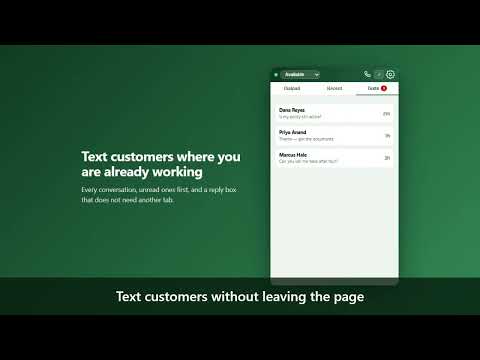
CoverTree Switchboard puts your phone system in the browser tab you are already working in. WHAT IT DOES • Click to call. Every phone number on any page gets a small phone icon beside it. One click on the icon rings your desk phone or your mobile; in Firefox it can connect the call right in the browser. In Chrome and Edge a browser-phone call is placed from Switchboard's phone window, which opens or comes forward and dials the number as soon as its phone is connected. With the CoverTree Phones desktop app open, the app places the call instead, in the same one click; a switch in the popup turns that off. • Text without switching tabs. Read and reply to customer conversations from the toolbar. • See who is calling. A name against the number, from your own contact records. • Know when somebody is waiting. The toolbar badge counts unread texts and callers in a queue. • Right-click any selected number to call or text it. Ctrl+Shift+D opens the dialpad; Ctrl+Shift+C calls whatever number you have selected. WHAT YOU NEED Your own CoverTree Switchboard account. This extension is a companion to it and does nothing on its own — it is not a phone service and does not work without a Switchboard server to connect to. Connecting takes one press: open Setup → Integrations → Browser extension in your dashboard and press "Connect this browser". There is nothing to copy and no key to paste. WHAT IT DOES NOT DO • It does not send the pages you visit anywhere. It reads the text on screen, in the browser, only to find the phone numbers to draw an icon beside, and sends a number to your own Switchboard server only when you point at its icon or click it. • It does not track you. There is no analytics, no telemetry and no advertising. Apart from your Switchboard server, it talks only to Twilio, for call audio, when you use its Firefox phone. • It never captures card details. Card numbers, security codes and expiry dates are excluded from the whole product, not just from this extension. WHO IT IS FOR Teams who answer and make calls all day and are tired of retyping numbers into a separate app.
0 out of 5No ratings
Details
- Version1.2.2
- UpdatedOctober 5, 2026
- Size89.34KiB
- LanguagesEnglish
- DeveloperWebsite
Email
ben@covertree.com - Non-traderThis developer has not identified itself as a trader. For consumers in the European Union, please note that consumer rights do not apply to contracts between you and this developer.
Privacy

CoverTree Switchboard has disclosed the following information regarding the collection and usage of your data. More detailed information can be found in the developer's privacy policy.
CoverTree Switchboard handles the following:
This developer declares that your data is
- Not being sold to third parties, outside of the approved use cases
- Not being used or transferred for purposes that are unrelated to the item's core functionality
- Not being used or transferred to determine creditworthiness or for lending purposes
Support
For help with questions, suggestions, or problems, visit the developer's support site