


Overview
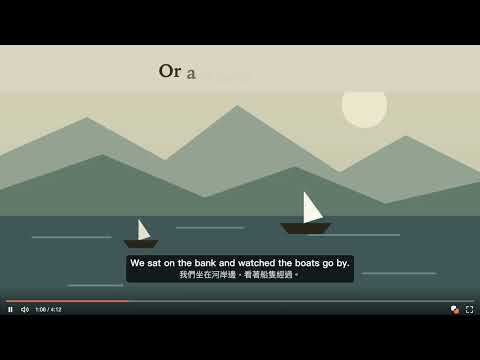
Free dual subtitles for YouTube. Click a word for its meaning, save it, and review it in the sentence you heard it in.
Learn a language from the YouTube videos you already watch. Couplet shows dual subtitles, gives you the meaning of any word you click, and brings saved words back in the sentence you heard them in. Free to use. WATCH WITH DUAL SUBTITLES • See the original above your language, with no need to turn on captions • Works on videos with subtitles, including auto-generated ones • Move and resize the subtitles, or show the lines before and after • Hide the translation to test yourself LOOK UP WITHOUT LEAVING THE VIDEO • Click a word for its meaning, phonetics, and example sentences • Hear it spoken • Drag across a phrase to translate it, even across two lines • The video can pause while you read KEEP WHAT YOU MEET • Save a word or phrase with one click • Each one keeps its sentence, the lines around it, and the moment in the video • Your list syncs between your computers, and exports as a CSV REVIEW IN CONTEXT • Saved words come back on a schedule, from ten minutes to two months • One click returns to the exact moment in the video • See your streak, your progress, and what needs more practice ASK AI WHEN A SENTENCE STAYS UNCLEAR • In your word list, get two or three sentences on meaning and grammar • 50 explanations a day LANGUAGES Learn English, Spanish, French, German, Portuguese, Italian, Japanese, or Korean, with translations into 22 languages. ACCOUNT AND PRIVACY Subtitles and lookups work without an account. To save and review, sign in with Google. Couplet is an independent product, not affiliated with YouTube or Google.
0 out of 5No ratings
Details
- Version0.4.1
- UpdatedNovember 11, 2026
- Size425KiB
- Languages2 languages
- DeveloperWebsite
Email
andrew289742@gmail.com - Non-traderThis developer has not identified itself as a trader. For consumers in the European Union, please note that consumer rights do not apply to contracts between you and this developer.
Privacy

Couplet: Dual Subtitles to Learn Languages on YouTube has disclosed the following information regarding the collection and usage of your data. More detailed information can be found in the developer's privacy policy.
Couplet: Dual Subtitles to Learn Languages on YouTube handles the following:
This developer declares that your data is
- Not being sold to third parties, outside of the approved use cases
- Not being used or transferred for purposes that are unrelated to the item's core functionality
- Not being used or transferred to determine creditworthiness or for lending purposes
Support
For help with questions, suggestions, or problems, visit the developer's support site